
Arcadia
Arcadia

App Design
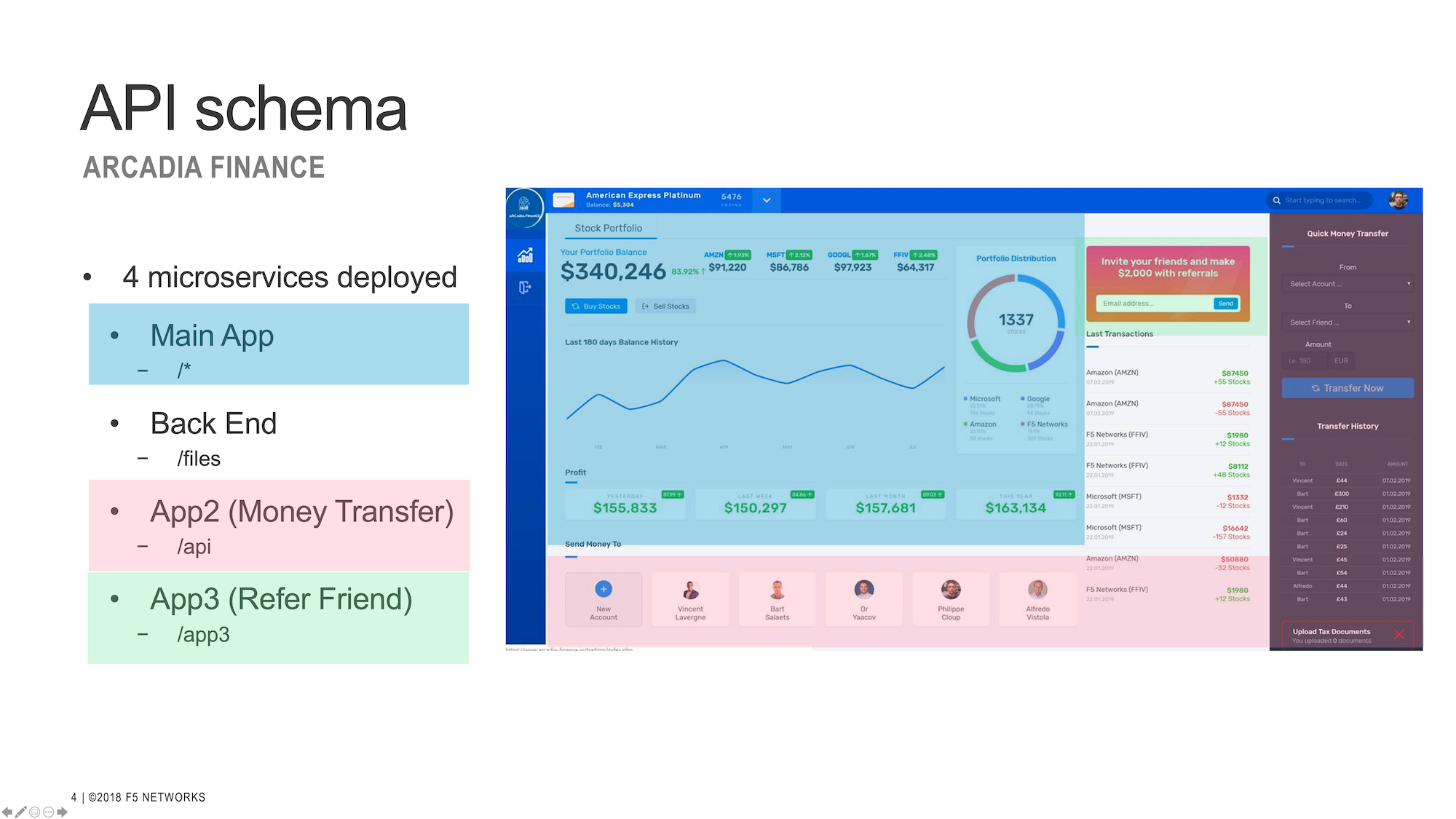
Arcadia app is split between 4 micro-services. More details here
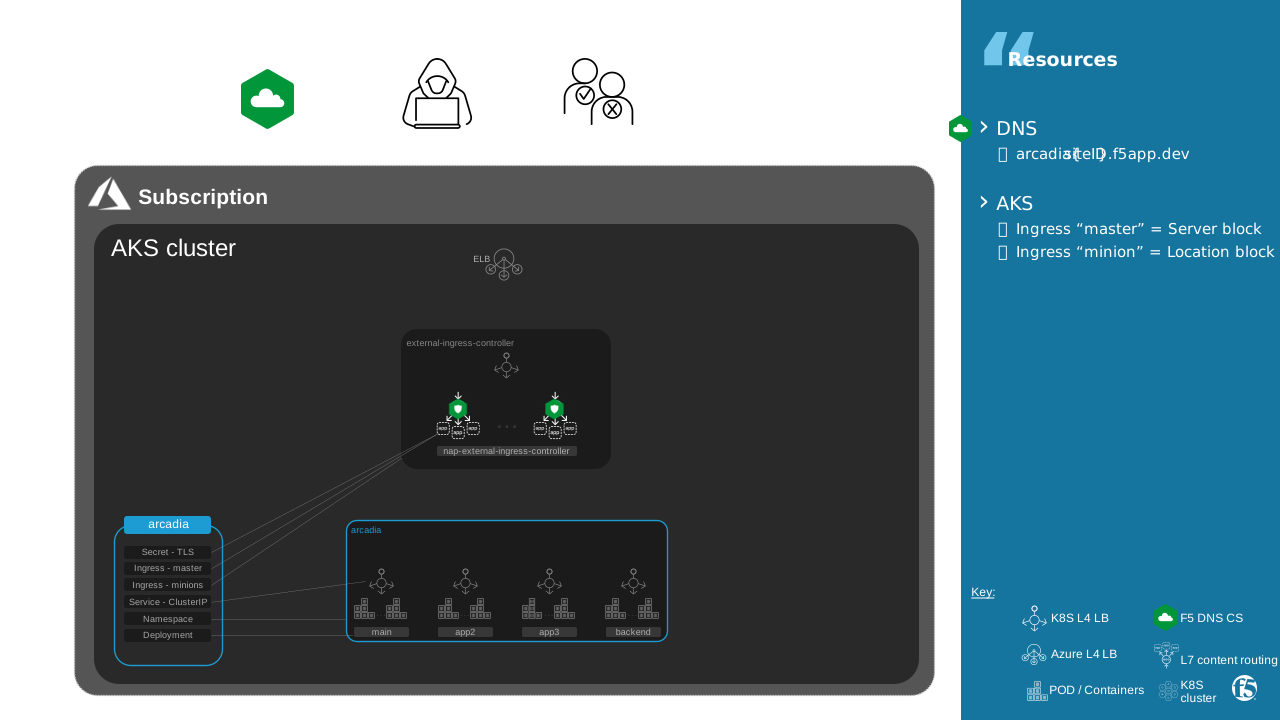
K8S resources
Arcadia is published through ingress class External.
Page rendering generates requests to each micro-service routed by Ingress Controller.
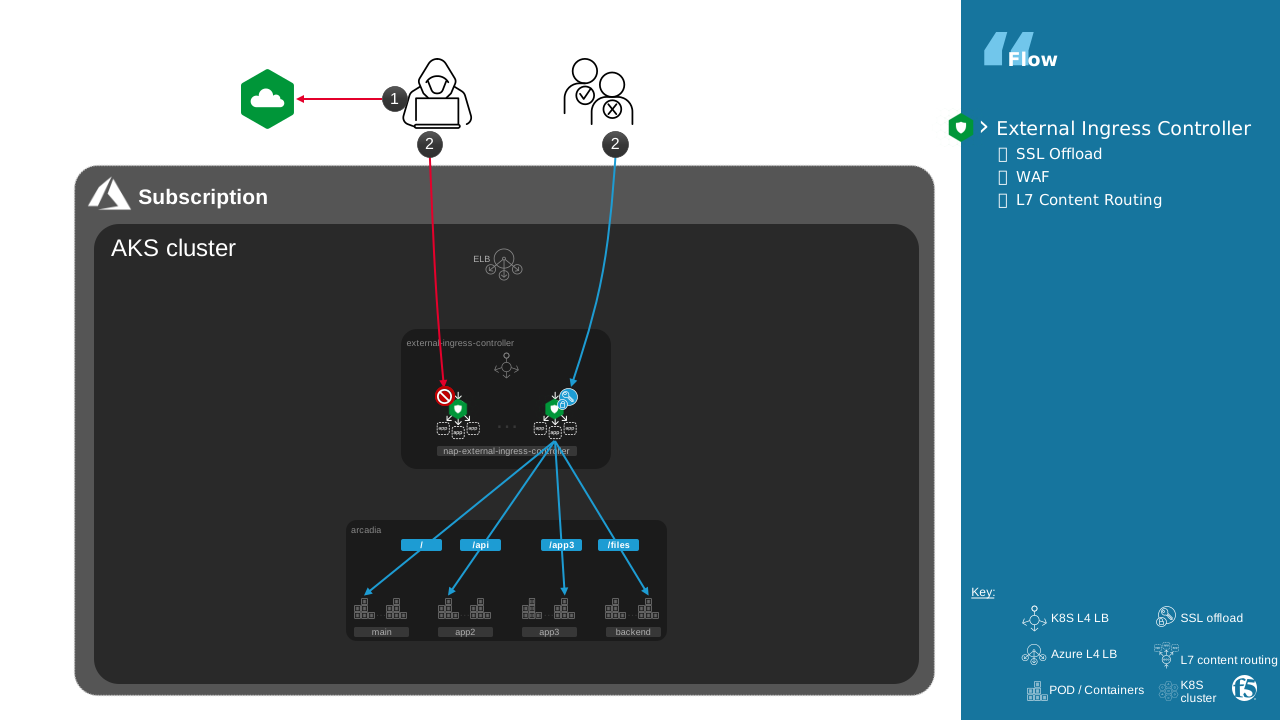
Connect to
https://arcadia{{site_ID}}.f5app.dev/Login with user
mattand passwordilovef5
Exercise 1: Master / Minions
Arcadia is published using mergeable Ingress.
Ingress configuration a spread for host arcadia{{site_ID}}.f5app.dev across multiple Ingress resources using Mergeable Ingress resources.
Here all resources belong to a same namespace lab1-arcadia but it could be different namespaces.
This enables easier management when using a large number of paths.
Connect to a IC container
$ kubectl get pods -n external-ingress-controller
NAME                                              READY   STATUS    RESTARTS   AGE
nap-external-ingress-controller-7576b65b4-ps4ck   1/1     Running   0          8d
nap-external-ingress-controller-7576b65b4-w599m   1/1     Running   0          8d

$ kubectl exec --namespace external-ingress-controller -it nap-external-ingress-controller-7576b65b4-ps4ck bash
Show Arcadia configuration
more /etc/nginx/conf.d/lab1-arcadia-arcadia-ingress-external-master.conf
Check that configuration of Arcadia is a merge results of a master and minions
server {
        # configuration for lab1-arcadia/arcadia-ingress-external-master

        location /api {
                # location for minion lab1-arcadia/arcadia-ingress-external-minion-app2
        }

        location /app3 {
                # location for minion lab1-arcadia/arcadia-ingress-external-minion-app3
        }

        location /files {
                # location for minion lab1-arcadia/arcadia-ingress-external-minion-backend
        }

        location / {
                # location for minion lab1-arcadia/arcadia-ingress-external-minion-main
        }
}
Show ingress resources for Arcadia
Show Master’s ingress resources for Arcadia
Capture The Flag
1.1 What is the cookie name that allow a login user to persist his session on “Money Transfer” micro-service of Arcadia across multiple ICs? | Tip: Session Persistence
Exercise 2: Advanced Configuration
Annotation
The Ingress resource only allows you to use basic NGINX features – host and path-based routing and TLS termination. For more advanced features like rewriting the request URI or inserting additional response headers, annotations here can be applied to an Ingress resource that allow to use advanced NGINX features and customize/fine tune NGINX behavior for that Ingress resource.
annotations:
  nginx.org/mergeable-ingress-type: "master"
Snippets
One annotation available is Snippets. Snippets allow you to insert raw NGINX config into different contexts of the NGINX configurations that the Ingress Controller generates. These should be used as a last-resort solution in cases where annotations entries cannot help.
annotations:
  nginx.org/server-snippets: |
    proxy_ignore_headers X-Accel-Expires Expires Cache-Control;
    proxy_cache_valid any 30s;
Capture The Flag
2.1 What is the nginx directive seen in configuration for snippet ‘proxy_ignore_headers’?
Disadvantages
Annotation and Snippets have the following disadvantages:
- Complexity
- Annotation can not reference an unique object, therefore:
all your configurations is flat and become quickly difficult to read
part of configuration is copied for each Master or Minion, for example jwt annotations. A simple change will impact a lot of resources and become risky.
- To use snippets, you will need to:
Understand NGINX configuration primitives and implement a correct NGINX configuration.
Understand how the IC generates NGINX configuration so that a snippet doesn’t interfere with the other features in the configuration.
- Decreased robustness
An incorrect snippet makes the NGINX config invalid, which causes reload failures. This will prevent any new configuration updates, including updates for the other Ingress resources, until the snippet is fixed.
- Security implications
Snippets give access to NGINX configuration primitives and those primitives are not validated by the Ingress Controller. For example, a snippet can configure NGINX to serve the TLS certificates and keys used for TLS termination for Ingress resources.
Note: If the NGINX config includes an invalid snippet, NGINX will continue to operate with the latest valid configuration