
Exercises
Exercises
This lab demonstrates the value added feature of NGINX App Protect managed by Controller:
Life Cycle Management
Scaling Policy: manual or auto Scale In / Scale Out using native Kubernetes features
Upgrade: Do Rolling Upgrade of NGINX App Protect instances using native Kubernetes feature
Security Update: Update the signatures and threats using Kubernetes Rolling Upgrade
Multi-Tenancy
Segregation: Isolate user roles (DevOps, NetOps, SecOps)
DevOps Self-Service: Deploy an application consuming a Security policy available in a catalog
Visibility: Define Service Level Indicators (SLI) and Service Level Objectives (SLO)
False Positive Management
Simple starting point: Start with a basic WAF policy and be reactive to handle False Positive
Standard and App specific policies: Bring your own policies and publish it in catalog
Update a policy widely: Update your policy and update automatically all Applications that reference it
Life Cycle Management
Exercise 1: Scaling Policy
In Lens, edit Deployment of NGINX App Protect instances:
Workloads>Deployments>NameSpace: waap-managed>nginx-appprotect

Scroll to see the environment variable when a POD starts
      env:
        - name: ENV_CONTROLLER_INSTANCE_GROUP
          value: lab_k8s_{{site_ID}}
        - name: ENV_CONTROLLER_LOCATION
          value: site{{site_ID}}_waap_managed
        - name: ENV_CONTROLLER_API_URL
          value: '10.0.0.12:443'
Note the value of Controller’s Instance-Group to be registered
In NGINX Controller, login as SuperNetOps
password: NGINXC0ntroller!
User Role of a SuperNetOps allows a user to view, create and delete any instance-groups (FULL authorization)
Click on
Non the top left in order to switch to menuinfrastructure
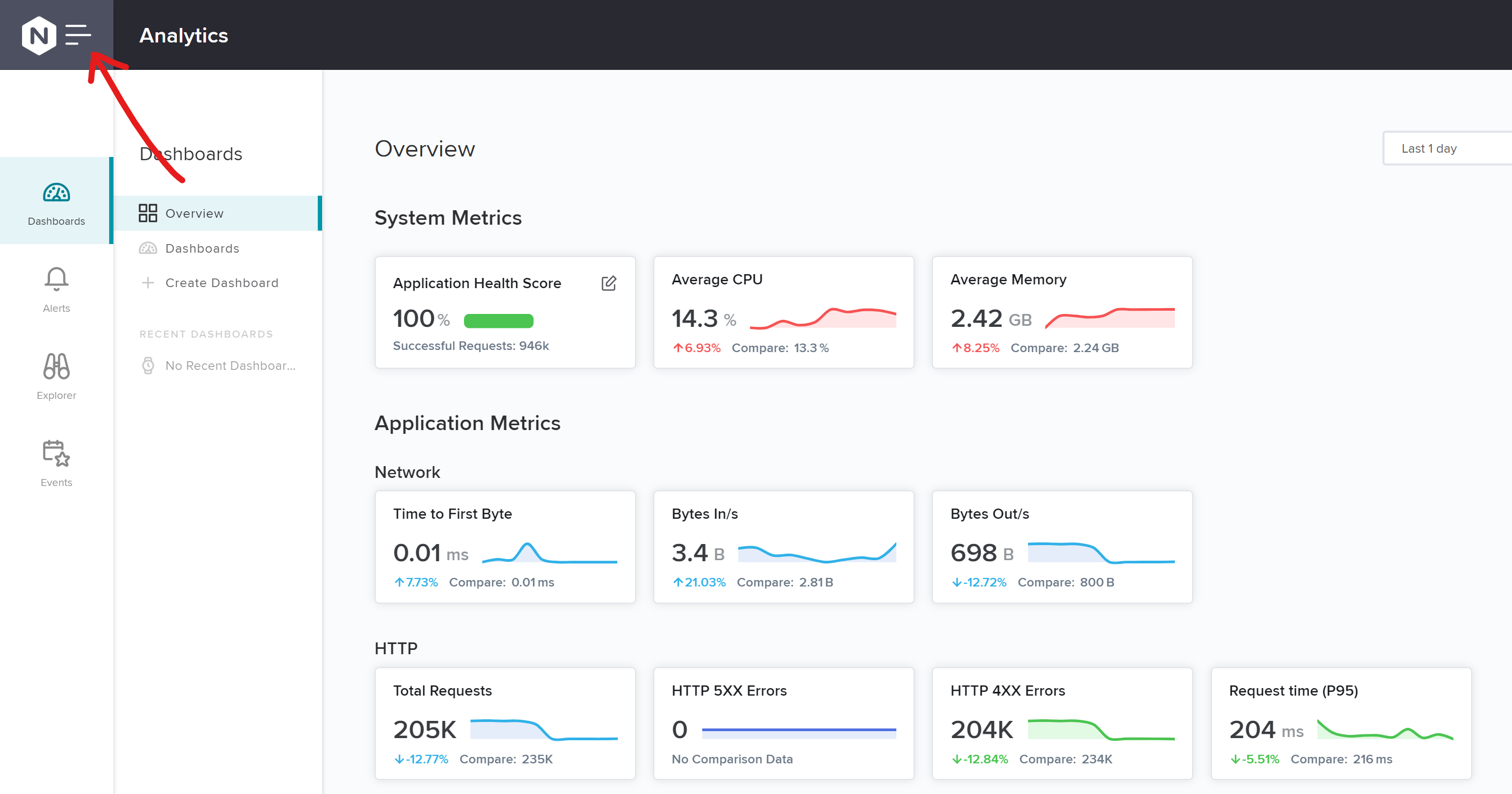
Click
Instance GroupsCheck if you see POD names of your Kubernetes cluster {{site_ID}}
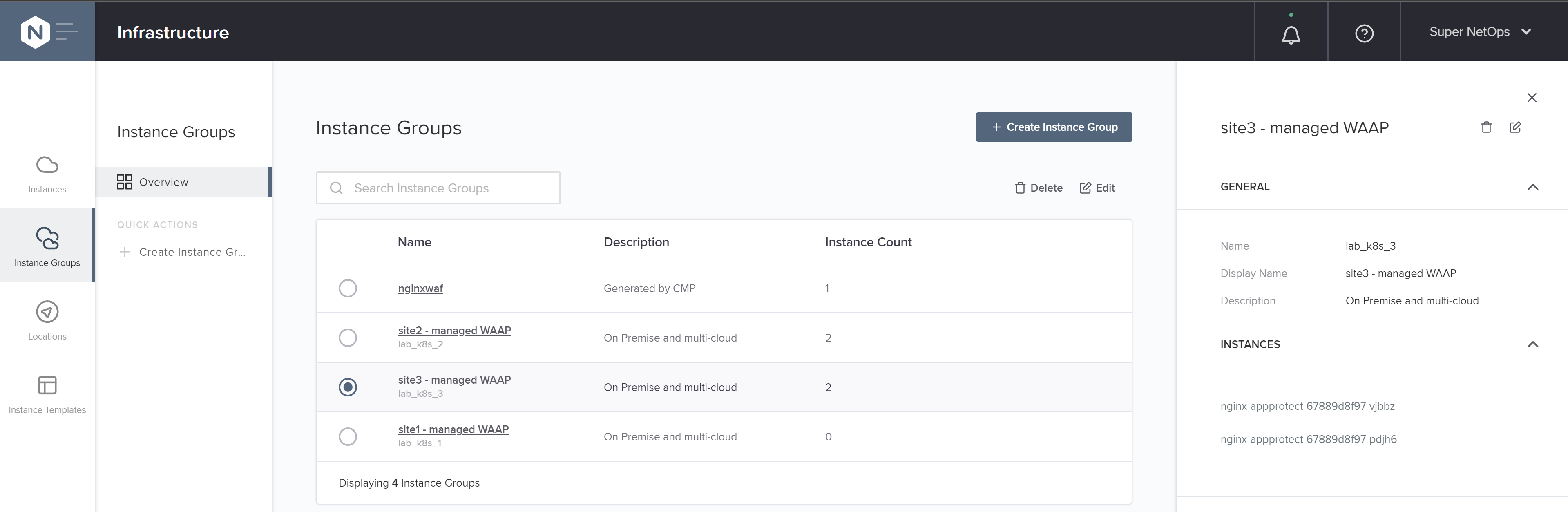
Click on an instance name
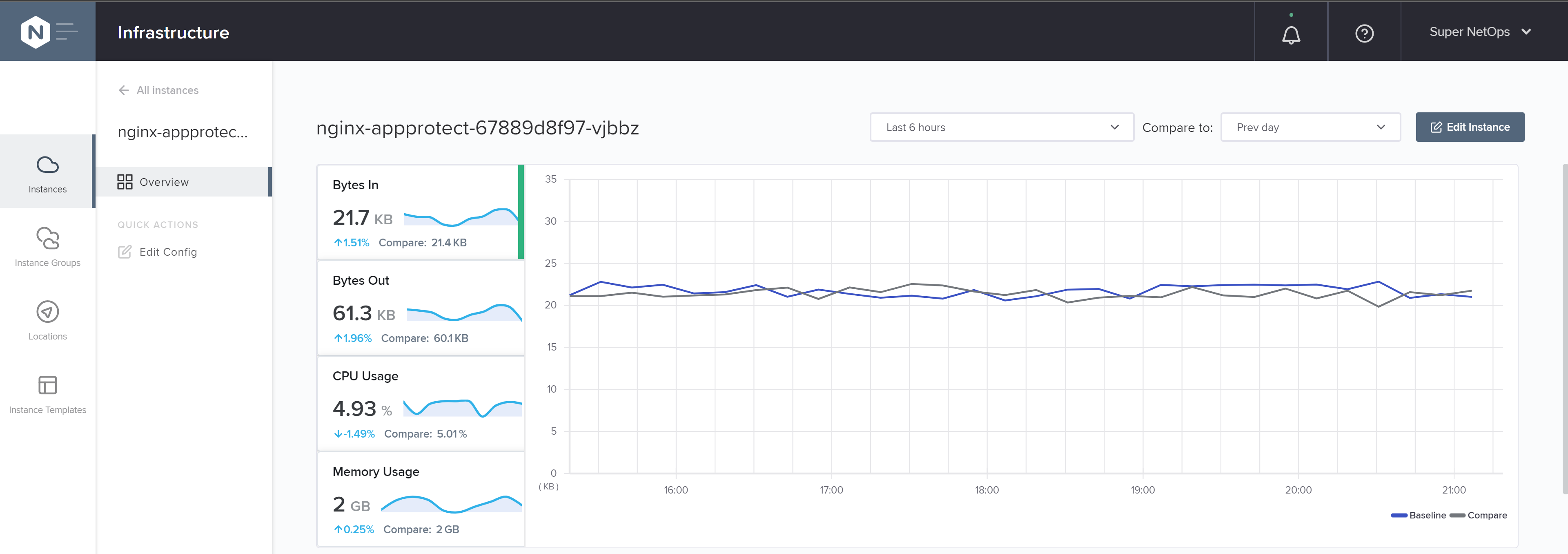
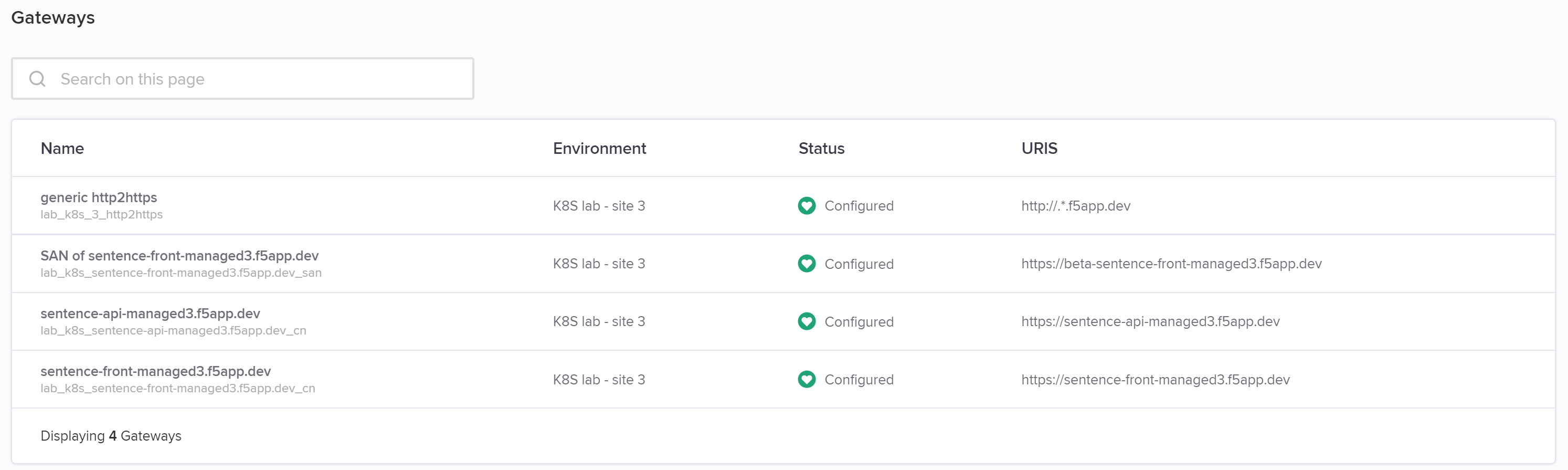
Scroll down to see Services running in this Instance
In Lens, you COULD manually scale out Deployment of NGINX App Protect instances BUT do not do that because an auto-scaling policy is in place
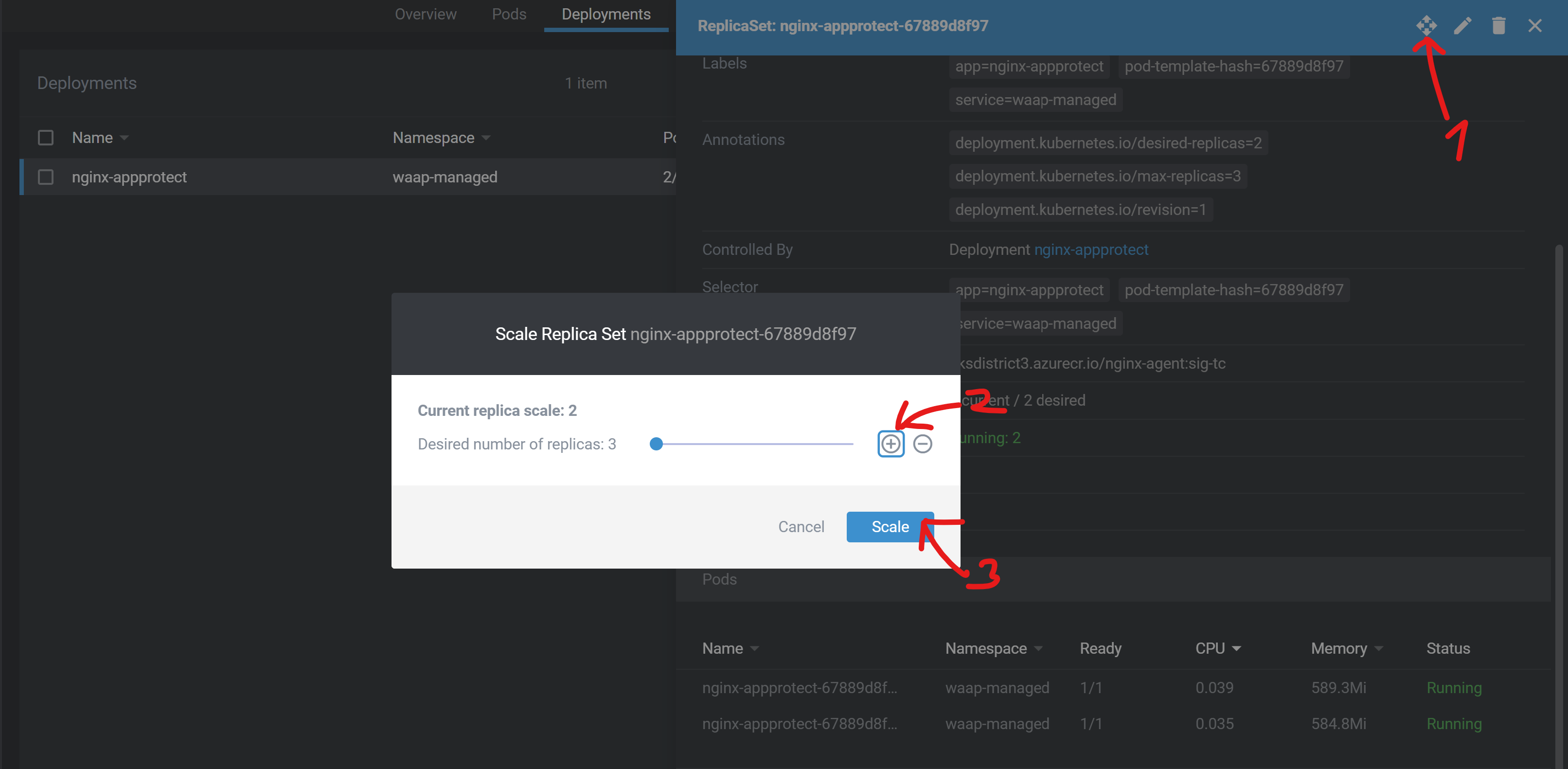
Horizontal Pod Autoscaler (HPA) manage the auto-scaling policy. Here, HPA is configured to maintain an average CPU utilization across all Pods less than 80%. See here for more details on the algorithm.
In Lens, go to
Configuration>HPA(Horizontal Pod Autoscaler)

Set
minReplicasvalue to 3 then click on Save & CloseHPA will increase the number of replicas (via the deployment)
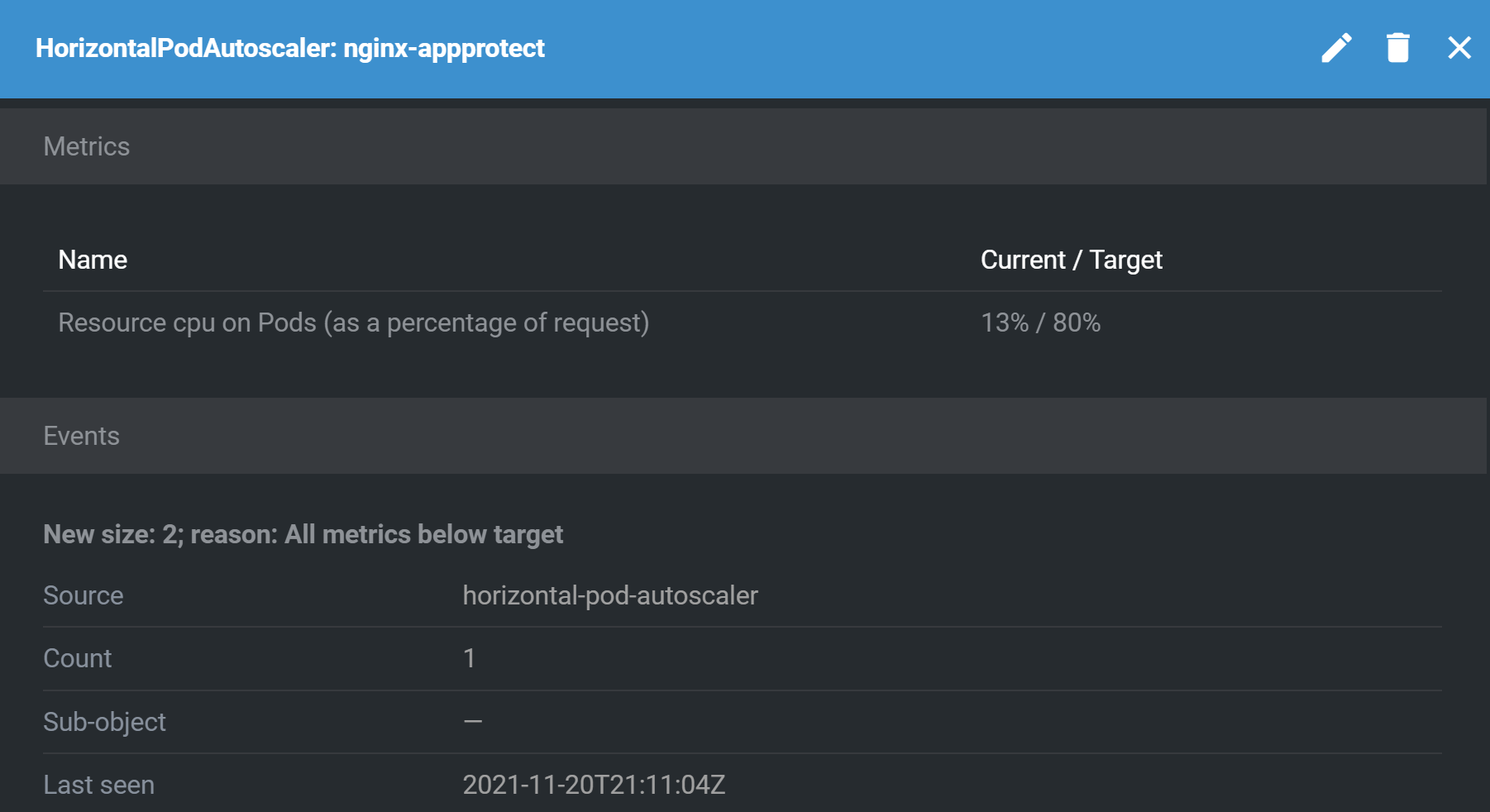
In Controller, see the new instance registered in instance-group
lab_k8s_{{site_ID}}
Capture The Flag
1.1 What is the threshold of CPU usage that raises a Scale Out?
Go back after 300 seconds, you will see 2 running replicas. See here for more details on the default behavior.
Exercise 2: Upgrade Signatures
Oh my god, deployed image of NGINX App Protect contains a very old signature package. Upgrade with a fresh image that have been already built and uploaded to Azure Container Registry linked to your AKS cluster.
In Lens, go to
Workloads>PODs>NameSpace: waap-managed>nginx-appprotectOpen a shell
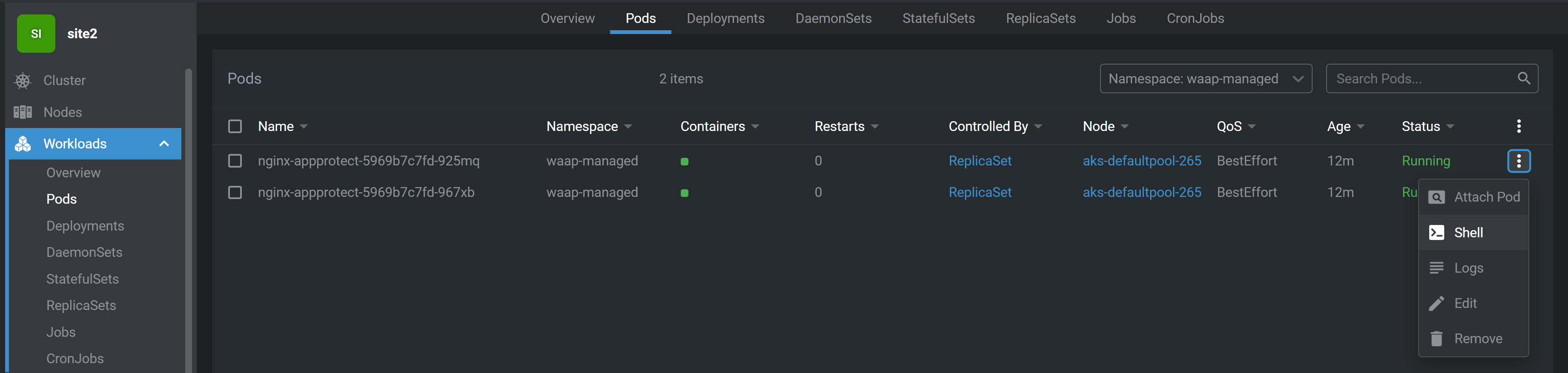
Show signature packages
cat /var/log/app_protect/compile_error_msg.json | python -m json.tool
output
{
    "user_signatures_packages": [],
    "threat_campaigns_package": {},
    "attack_signatures_package":
    {
        "revision_datetime": "2019-07-16T12:21:31Z"
    },
    "completed_successfully": true
}
Capture The Flag
2.1 What is the last update of signature package?
2.2 What is the last update of Threat Campaign?
Show the last update of signature package
sudo yum --showduplicates list app-protect-attack-signatures
Show the last update of Threat Campaign
sudo yum --showduplicates list app-protect-threat-campaigns
Go to
Workloads>Deployments>NameSpace: waap-managed>nginx-appprotect> EditUpdate specification using latest image of NGINX App Protect (use CTRL+F on word image)
spec:
  ...
  template:
    ...
    spec:
      containers:
        - name: nginx-agent
          image: 'aksdistrict2.azurecr.io/nginx-agent:latest'
View rolling upgrade of PODs by clicking on
nginx-appprotectdeploymentOpen a shell on a fresh POD
Show signature packages and see that packages are now up-to-date
cat /var/log/app_protect/compile_error_msg.json
output
{
    "user_signatures_packages":
    [],
    "attack_signatures_package":
    {
        "revision_datetime": "2021-11-04T19:18:42Z",
        "version": "2021.11.04"
    },
    "completed_successfully": true,
    "threat_campaigns_package":
    {
        "revision_datetime": "2021-11-03T07:51:14Z",
        "version": "2021.11.03"
    }
}
Multi-Tenancy
Exercise 3: Super NetOps
User Role “SuperNetOps” allows user:
to manage NGINX App Protect instances (FULL authorization)
to view all Services (READ authorization)
In NGINX Controller, login as SuperNetOps
password: NGINXC0ntroller!
Go to
Platform>User Rolethen see configuration PATHs and attached authorization levels
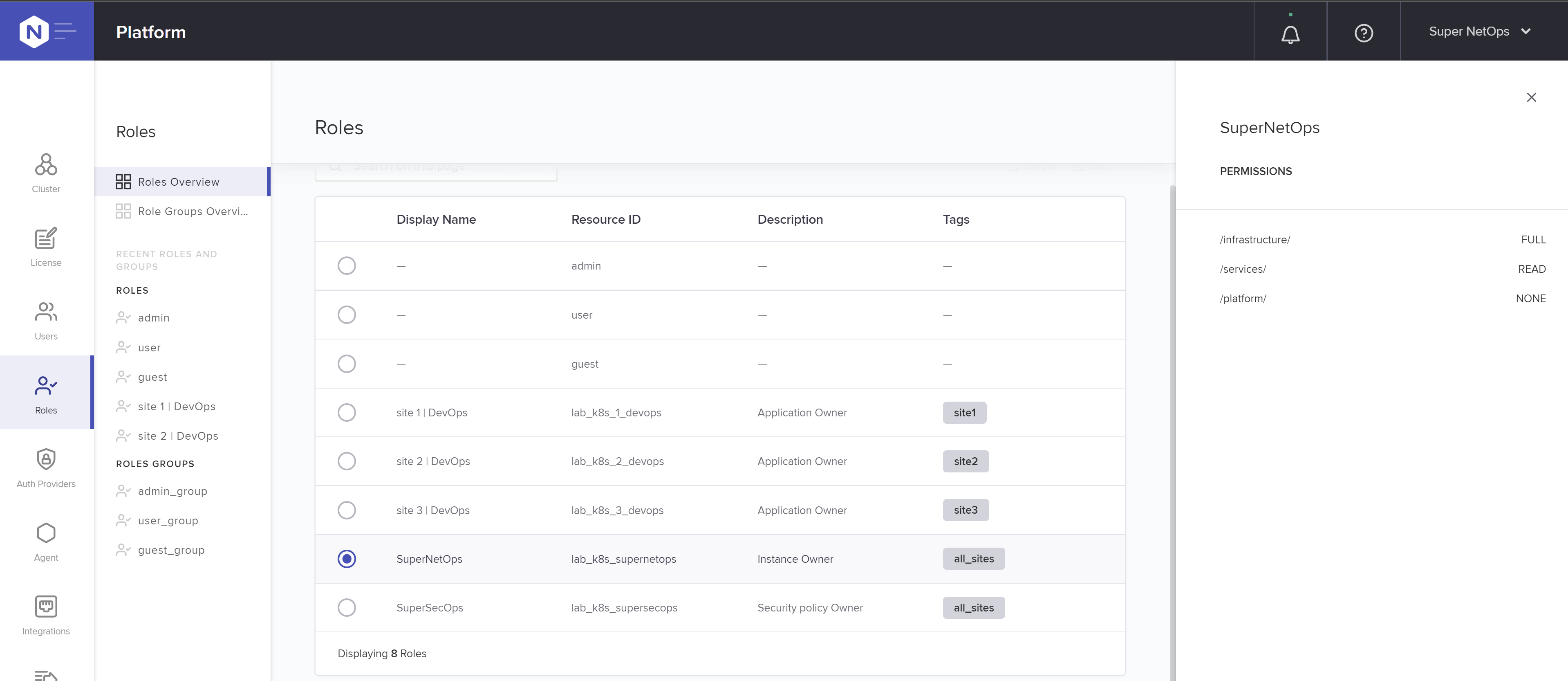
Go to
Services>Gateway. You can see all gateways but edit none.
Exercise 4: Super SecOps
User Role “SuperSecOps” allows user:
to manage all WAF policies (FULL authorization)
to view all Services (READ authorization)
In NGINX Controller, login as SuperSecOps in a different web browser if you can
password: NGINXC0ntroller!
Go to
Platform>User Rolethen see configuration PATHs and attached authorization levels
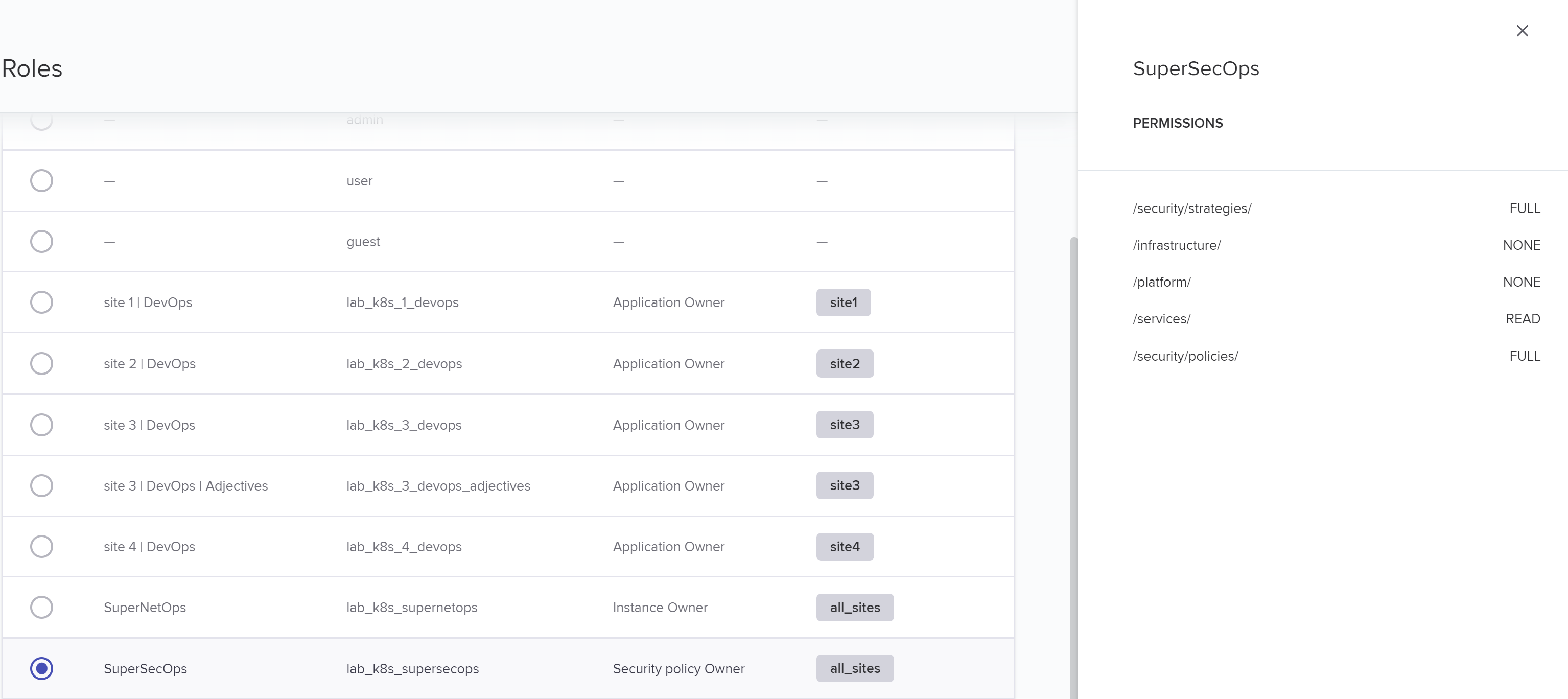
Go to
Services>Security StrategiesSee all Security Strategies available for consumption by DevOps
Exercise 5: DevOps
User Role “DevOps” allows user:
to manage (FULL authorization) his applications inside his own environment {{ site_ID }} only
to view all WAF policies (READ authorization)
In NGINX Controller, login as DevOps owner of your site
email: devops{{ site_ID }}@f5cloudbuilder.dev
password: NGINXC0ntroller!
Go to
Platform>User Rolethen see configuration PATHs and attached authorization levels
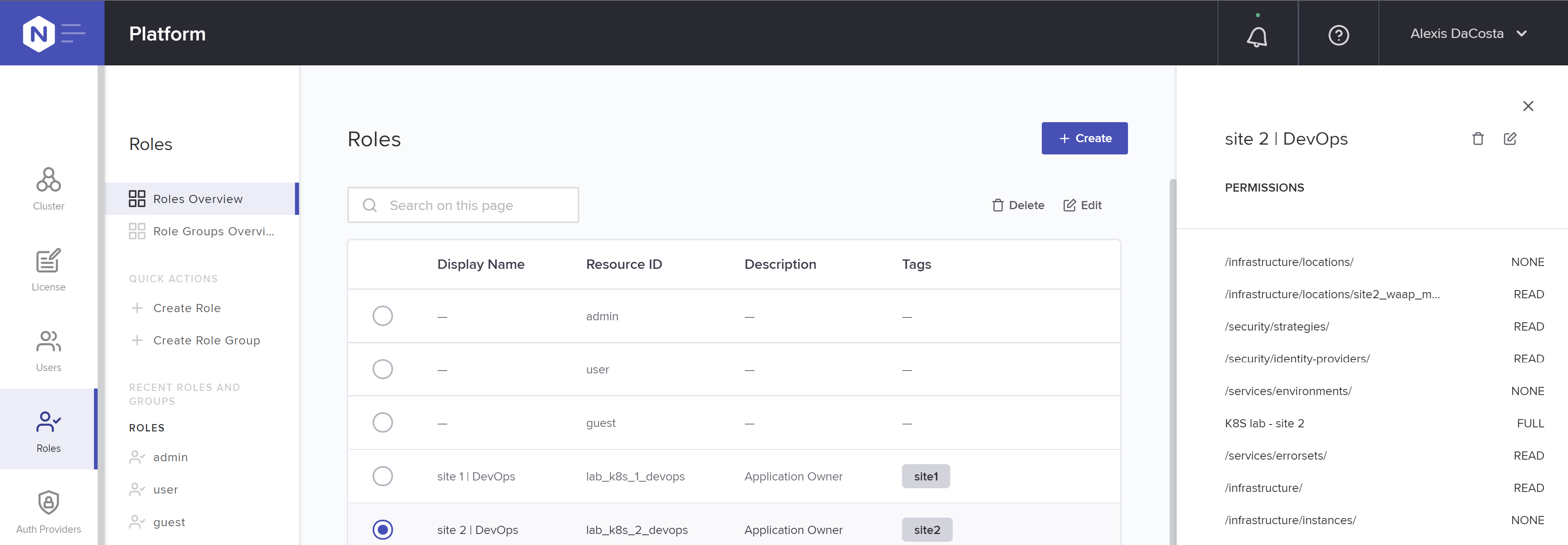
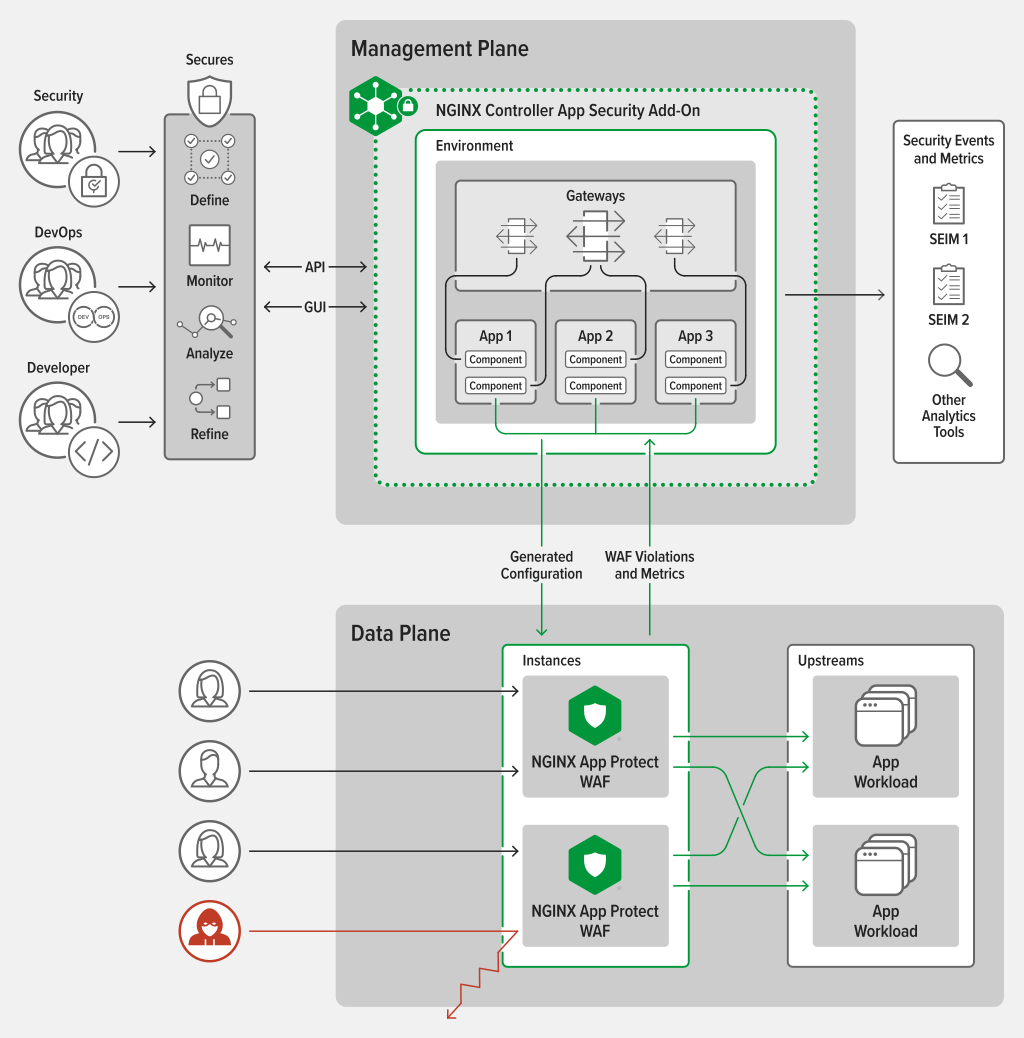
DevOps configure an Application using logical objects:
- Environment: a Tenant.
A DevOps user is assigned into one or multiple Tenants aka Environment
- Gateway: a listener on TCP/UDP service or on HTTP(s) host(s).
A Gateway is a configuration object within an Environment, often used as the top level for defining how applications are delivered to customers – settings such as hostname, protocol, and TLS/SSL behavior – though such settings can also be made at a lower level. Gateways also employ the concept of Placement which is how you link Controller and the NGINX App Protect instances that receive the configurations and do the actual work (data-plane).
- App: a logical group of Components
App configuration object is where you begin to model applications and group traffic‑shaping behaviors. You can use as many or as few Apps as needed to meet the needs of your organization. The only requirement is that an App must be unique within an Environment.
- Component: a Traffic Management policy with a Security strategy attached.
Within an App, Components describe the desired traffic‑shaping behavior for the App. In the simplest case, all the traffic for a given pathname is sent to the same group of servers. But Components also control more advanced shaping like header manipulation, URL rewriting, backend load‑balancing behaviors, cookie handling, and other settings.
- Analytics: auto-generated or custom dashboard offer observability (metrics, security event) at each object level
Application Insights offer a clear visibility into the number, performance, and ownership costs of your apps With per‑app analytics, you gain new insights into app performance and reliability so you can pinpoint performance issues before they impact production.
In case of an Application based on micro-services, teams works on different Components. For example, Sentence API has different micro-services:
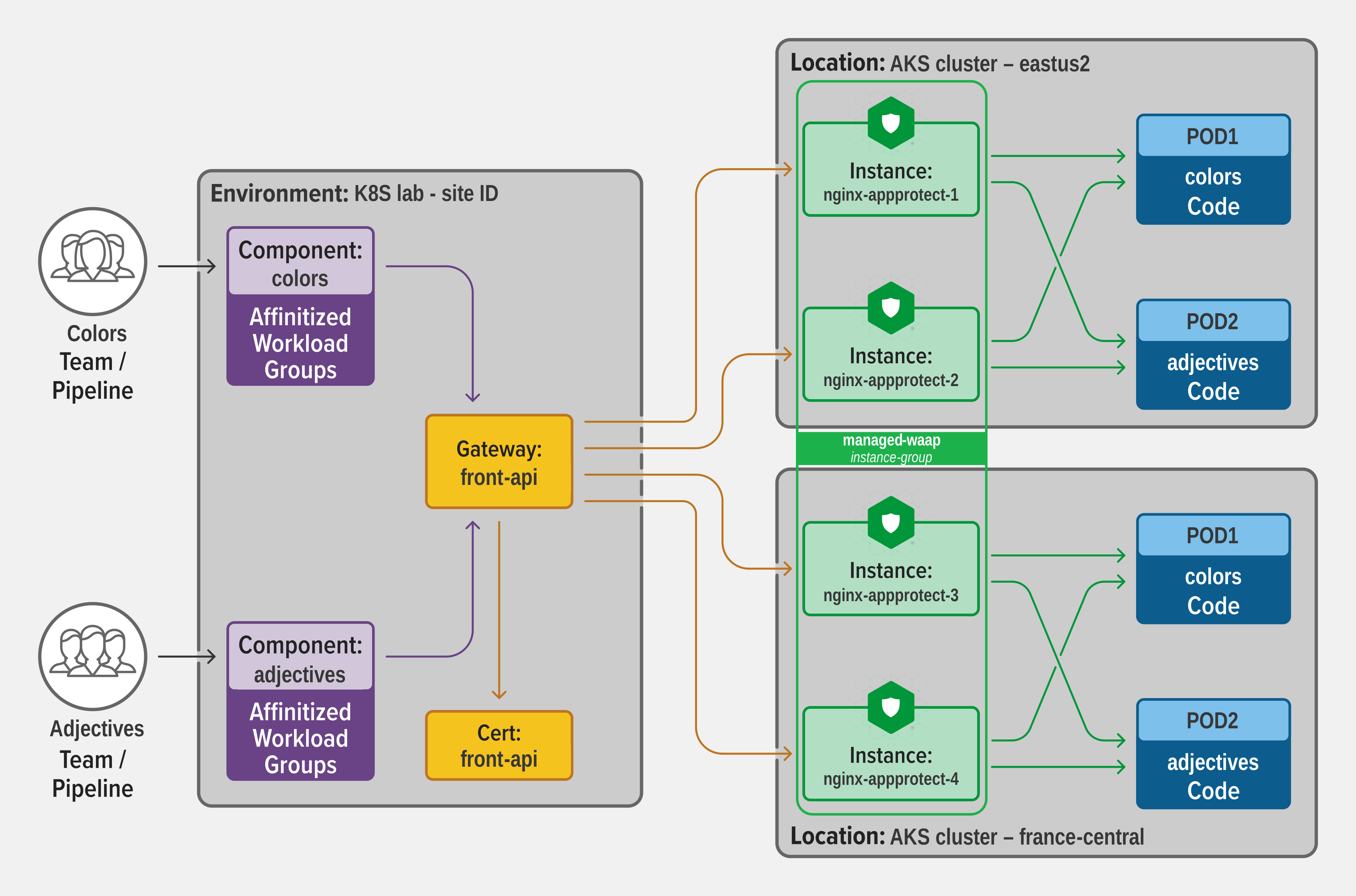
Go to
Services>Gateways>sentence-front-managed{{ site_ID }}.f5app.devEdit Gateway>Placements: show attachedinstance-group
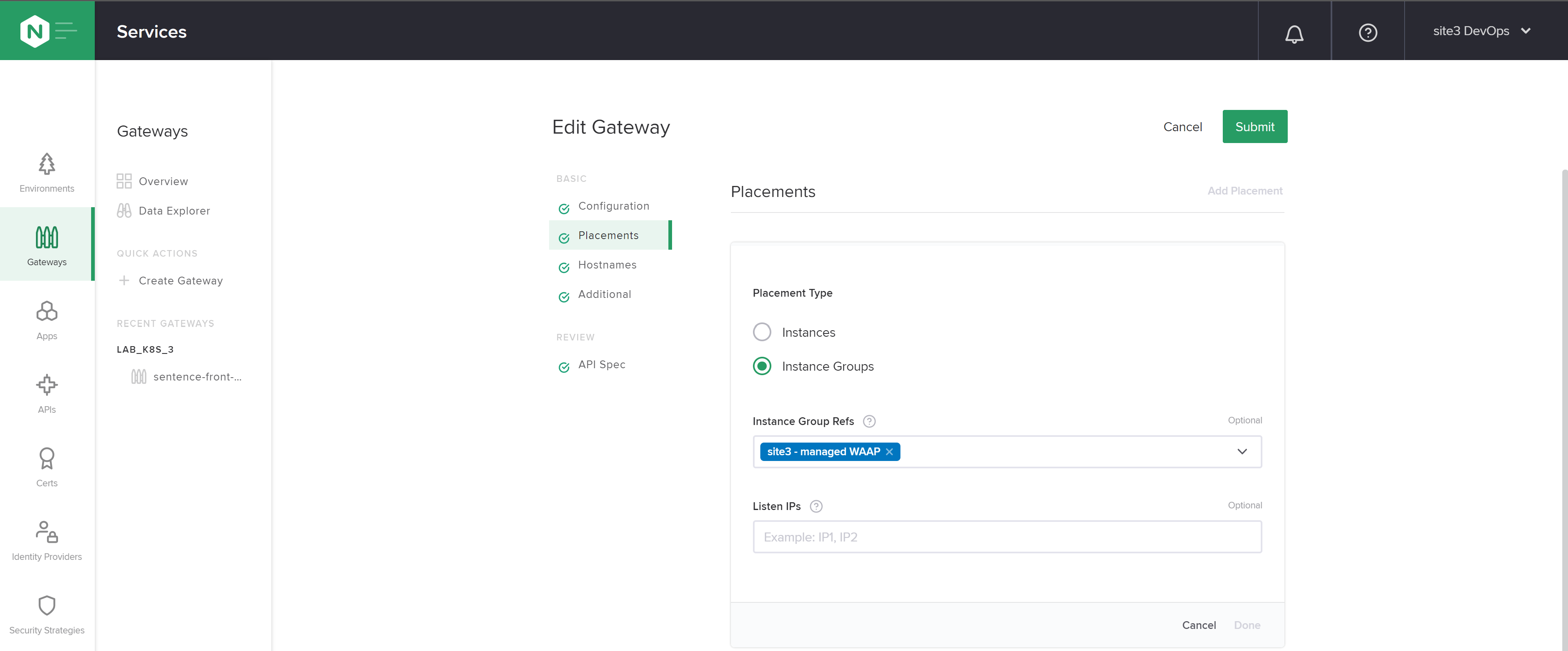
Note: NGINX Controller v4: specific instance-groups could be assign to a User Role
In your web browser, go to
https://sentence-front-managed{{ site_ID }}.f5app.devand generate some traffic by refreshing 10 times the pageGo to
Services>Apps>sentence-front-managed{{ site_ID }}.f5app.devUpdate filter to
Last 5 minutesSwitch tab to
Latency metrics, click on compare toPrev weekand see graphs
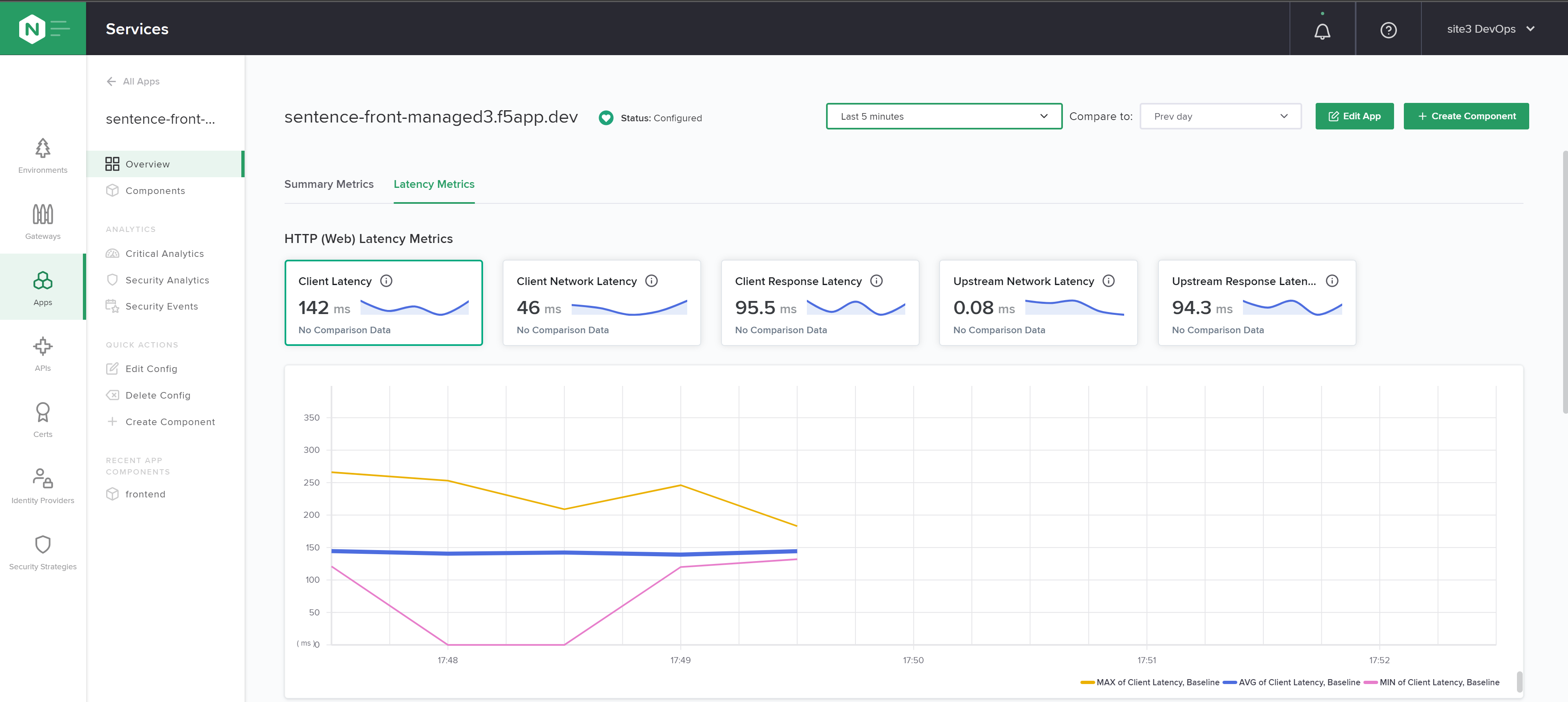
Go to
Components>frontendUpdate filter to
Last 5 minutesSwitch tab to
Latency metrics, click on compare toPrev weekand see graphs
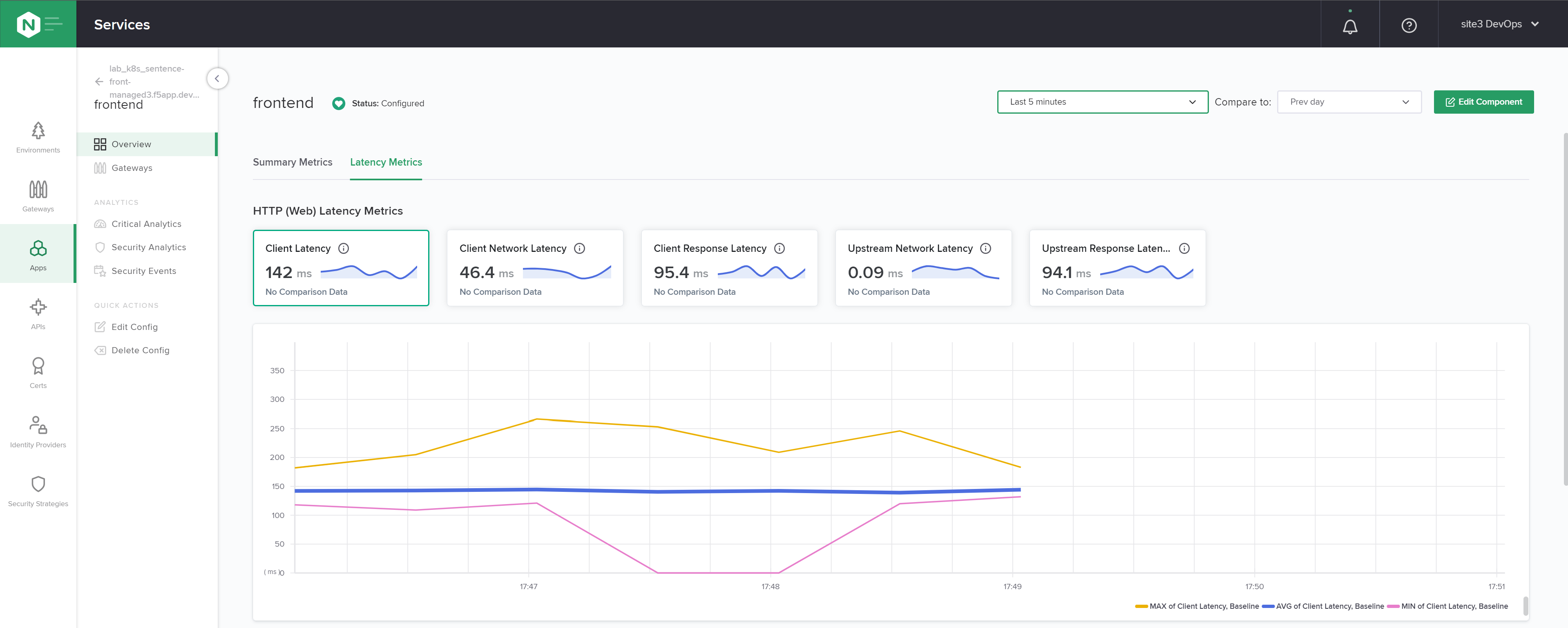
False Positive Management
Exercise 6: Simple starting point
If SecOps doesn’t have time to specify a standard WAF policy, a good way is to
use the pre-defined
balanced_defaultWAF policy in Monitoring mode,disable matched Signatures to prevent False Positives during QA tests and then in Production,
enable policy in Blocking mode after few weeks in Production
disable matched Signatures in case of complain from legitimate user
In NGINX Controller, login as DevOps owner of your site
email: devops{{ site_ID }}@f5cloudbuilder.dev
password: NGINXC0ntroller!
Go to
Services>Apps>sentence-front-managed{{ site_ID }}.f5app.dev>Components>frontendClick on
Edit component>SecurityChoose Security Strategy proposed by default:
balanced_defaultthenSubmit
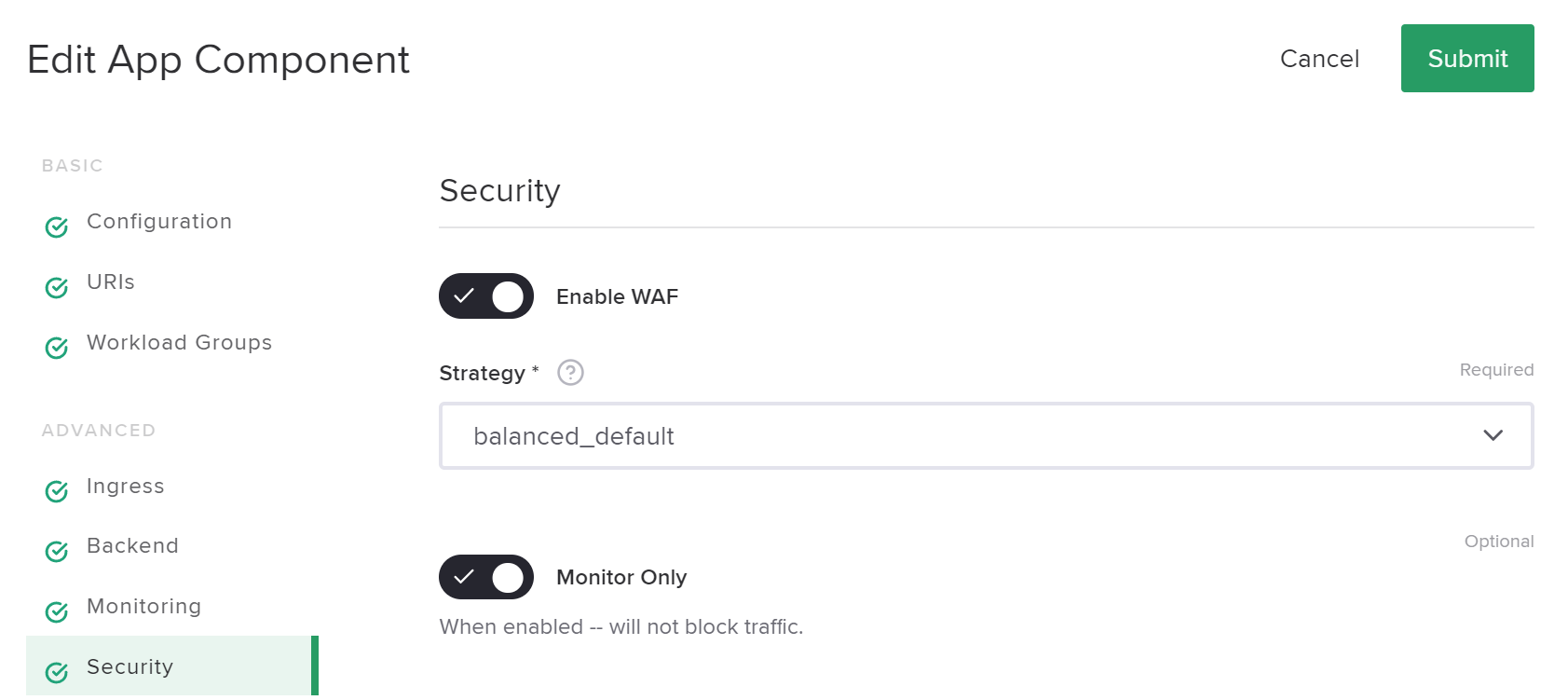
Choose Strategy proposed by default:
balanced_defaultthenSubmitOn your web browser, do an attack:
https://sentence-front-managed{{ site_ID }}.f5app.dev?a=<script>alert('This is an attack');</script>
In Controller, show related Security event
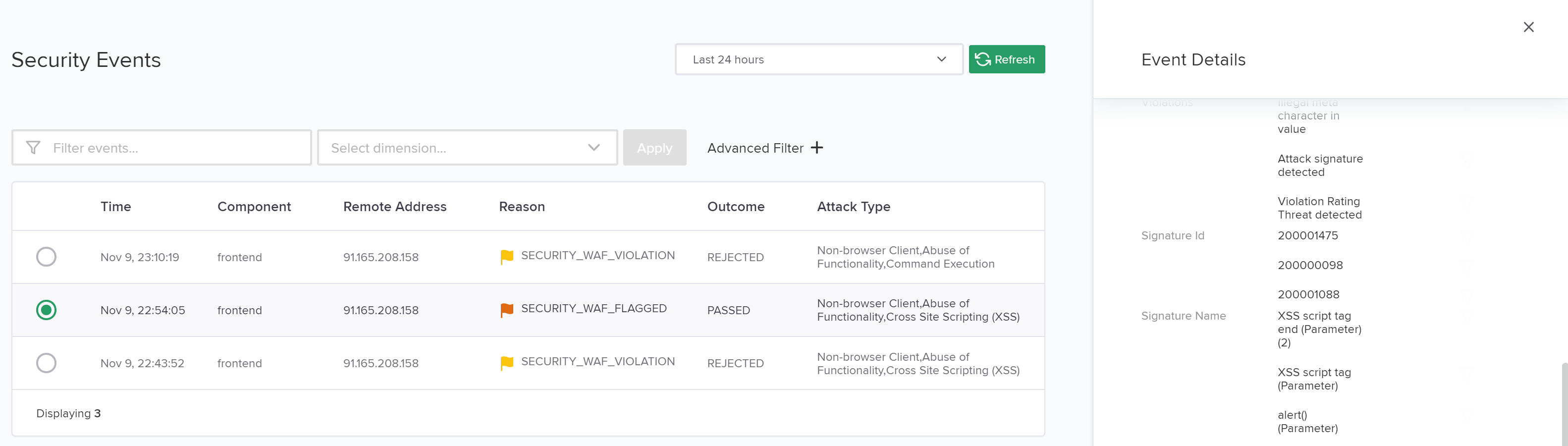
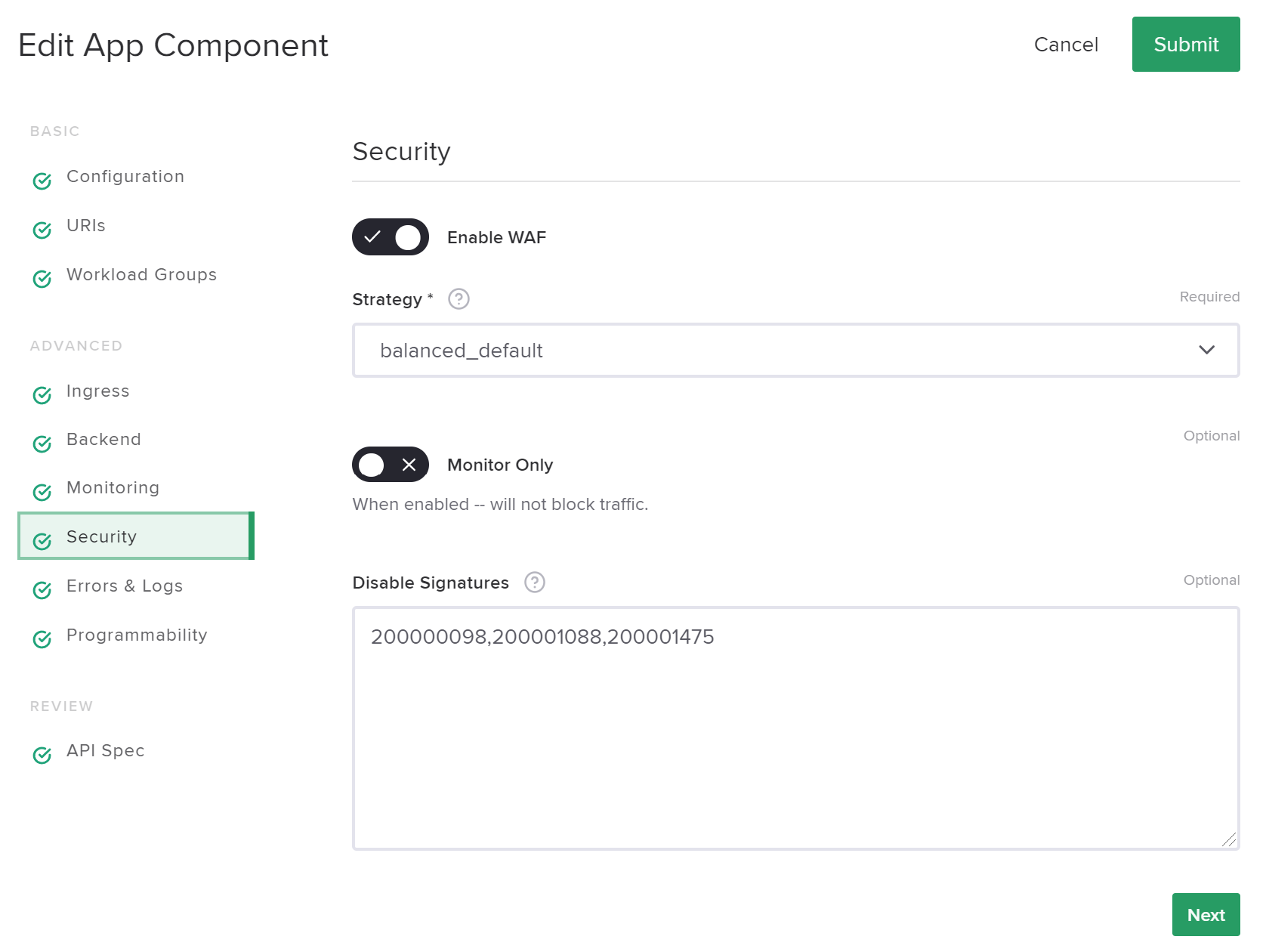
Disable related signatures, set Security Strategy to blocking mode then Submit
On your web browser, do an attack:
https://sentence-front-managed{{ site_ID }}.f5app.dev/?a='1=1;cat /etc/password'
Note the support ID on the blocking page
In Controller, show related Security event by filtering on support ID
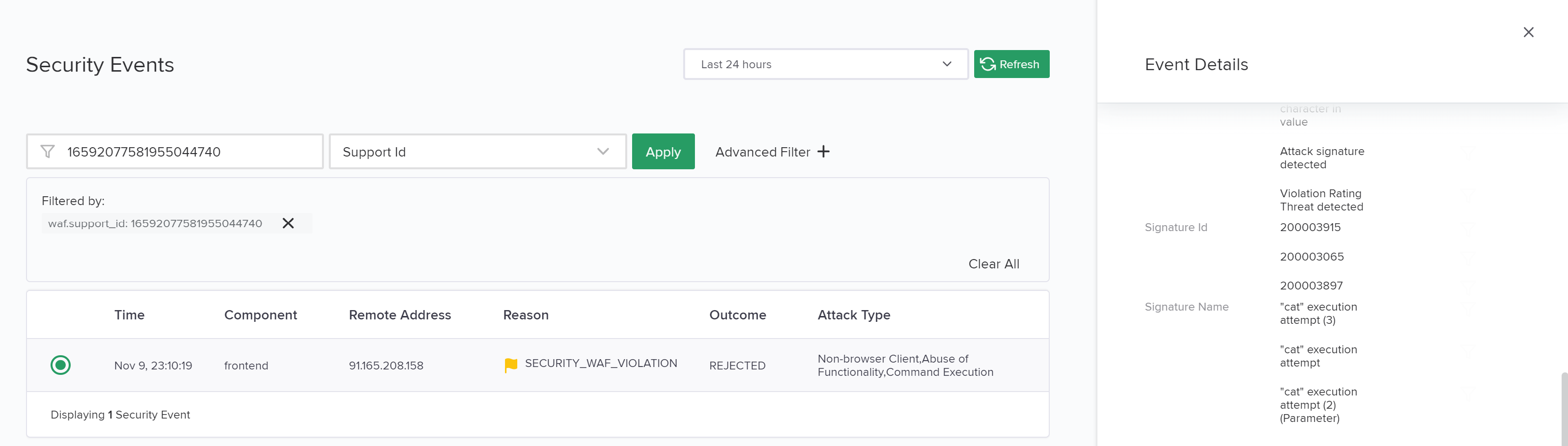
Append related signatures to disabled list of signatures then Submit
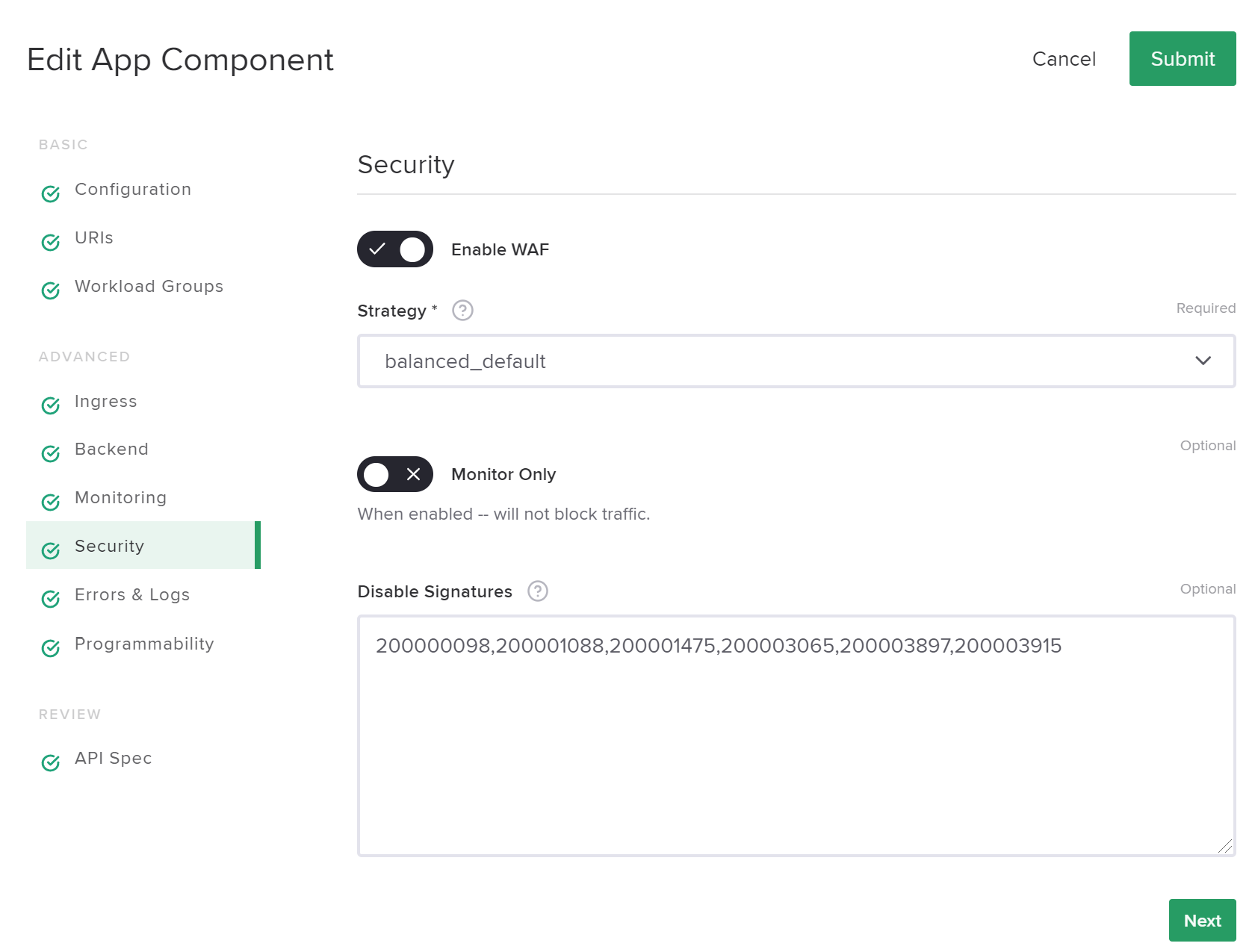
On your web browser, repeat the attack and see that is not blocked anymore
https://sentence-front-managed{{ site_ID }}.f5app.dev/?a='1=1;cat /etc/password'
Exercise 7: Standard and App specific policy
A good approach is to define few WAAP policies in order to cover Risk Prevalence by App Criticality. For example:
Tier1
Less Critical App with no user’s persistent privacy data Protect from software vulnerabilities and common attack vectors Tier1 is is a generic policy
Tier2
Medium Critical App with user’s persistent privacy data or generate a loss of revenue if App is out of service Protect from targeted attacks and advanced threat actors Tier2 should start using a generic policy and then be customized if needed
Tier3
Most Critical App that need an external communication of your company if an incident or a breach is encountered Protect from advanced fraud and highly specialized techniques Tier3 is clearly an App specific Policy
3 ways to define a policy:
1. Prepare in BIG-IP UI
if SecOps used to define WAF policy on BIG-IP, he can still continue to define it using BIG-IP UI and import it in Controller by following this guide

Go to Jumphost
mkdir /tmp/converter
cp /root/source_images/f5-nap-policies/policy/owasp_rdp.xml /tmp/converter/
docker run -v /tmp/converter/:/tmp/converter/ aksdistrict{{ site_ID }}.azurecr.io/nap_converter_tool /opt/app_protect/bin/convert-policy -i /tmp/converter/owasp_rdp.xml -o /tmp/converter/policy.json | jq
The output warns you about features not implemented yet in NGINX App Protect
2. Prepare in WAFFLER
Use this tool to discover how to create a basic Declarative Policy through an UI
allow only
server-technologies:Nginx,Node.jsandPythonIn
Blocking Settings, alarm and block on violationIllegal file typeIn
File Types, add filetypemdIn
Blocking Settings, enable violationIllegal URLIn
URLs, add wildcard url/admin*In
Blocking Settings, enable violationIP is in the deny listIn
whitelist-ips, add a public ip address andalwaysblock it
output
{
  "policy": {
    "name": "policy_name",
    "template": {
      "name": "POLICY_TEMPLATE_NGINX_BASE"
    },
    "applicationLanguage": "utf-8",
    "enforcementMode": "blocking",
    "server-technologies": [
      {
        "serverTechnologyName": "Nginx"
      },
      {
        "serverTechnologyName": "Node.js"
      },
      {
        "serverTechnologyName": "Python"
      }
    ],
    "bot-defense": {
      "mitigations": {},
      "settings": {
        "isEnabled": false
      }
    },
    "urls": [
      {
        "name": "/admin*",
        "wildcardOrder": 0,
        "protocol": "https",
        "type": "wildcard",
        "attackSignaturesCheck": true,
        "metacharsOnUrlCheck": true
      }
    ],
    "filetypes": [
      {
        "name": "md",
        "wildcardOrder": 0
      }
    ],
    "whitelist-ips":
    [
        {
            "blockRequests": "always",
            "ipAddress": "1.1.1.1",
            "ipNetmask": "255.255.255.255"
        }
    ],
    "blocking-settings": {
      "violations": [
        {
          "name": "VIOL_FILETYPE",
          "alarm": true,
          "block": true
        },
        {
          "name": "VIOL_URL",
          "block": true,
          "alarm": true
        },
        {
          "name": "VIOL_BLACKLISTED_IP",
          "block": true,
          "alarm": true
        }
      ]
    }
  }
}
3. Advanced tuning
SecOps can tune his policy directly in the JSON file. More explanation in this guide and all details in the Schema reference
disallow filetype using
allowedkey with valuefalsedisallow url using
allowedkey with valuefalsedefine you own
responseContentas shown at the end dof the JSON example below
output
{
    "policy":
    {
        "name": "policy_name",
        "template":
        {
            "name": "POLICY_TEMPLATE_NGINX_BASE"
        },
        "applicationLanguage": "utf-8",
        "enforcementMode": "blocking",
        "server-technologies":
        [
            {
                "serverTechnologyName": "Nginx"
            },
            {
                "serverTechnologyName": "Node.js"
            },
            {
                "serverTechnologyName": "Python"
            }
        ],
        "urls":
        [
            {
                "name": "/admin*",
                "wildcardOrder": 0,
                "protocol": "https",
                "type": "wildcard",
                "attackSignaturesCheck": true,
                "metacharsOnUrlCheck": true,
                "isAllowed": false
            }
        ],
        "filetypes":
        [
            {
                "name": "md",
                "wildcardOrder": 0,
                "allowed": false
            }
        ],
        "whitelist-ips":
        [
            {
                "blockRequests": "always",
                "ipAddress": "1.1.1.1",
                "ipNetmask": "255.255.255.255"
            }
        ],
        "blocking-settings":
        {
            "violations":
            [
                {
                    "name": "VIOL_FILETYPE",
                    "alarm": true,
                    "block": true
                },
                {
                    "name": "VIOL_URL",
                    "block": true,
                    "alarm": true
                },
                {
                    "name": "VIOL_BLACKLISTED_IP",
                    "block": true,
                    "alarm": true
                }
            ]
        },
        "response-pages":
        [
            {
                "responseContent": "<html><head><title>NGINX workshop</title></head><body><h1>Blocking page</h1><br><br>Support = <%TS.request.ID()%></body></html>",
                "responseHeader": "HTTP/1.1 200 OK\r\nConnection: close",
                "responseActionType": "custom",
                "responsePageType": "default"
            }
        ]
    }
}
save this policy in a file locally
In NGINX Controller, login as SuperSecOps
password: NGINXC0ntroller!
Go to
Services>Security StrategiesCreate a strategy named
lab5_site{{site_ID}}that reference a policy named alsolab5_site{{site_ID}}Import your file and check if JSON syntax is green
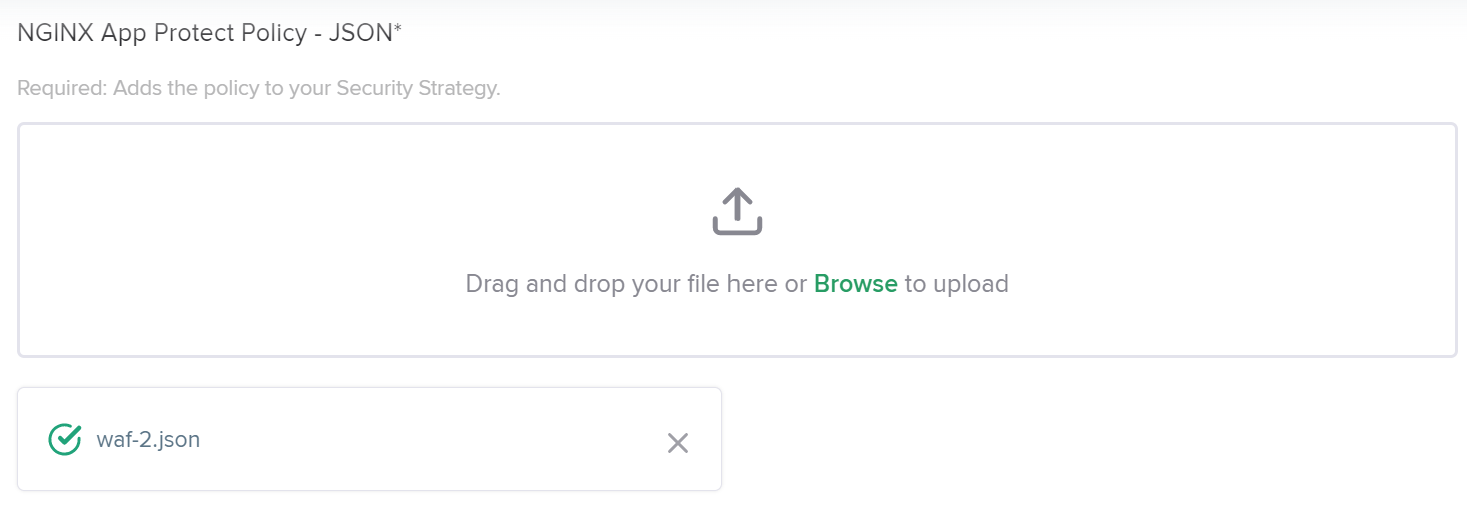
In NGINX Controller, login as DevOps owner of your site
email: devops{{ site_ID }}@f5cloudbuilder.dev
password: NGINXC0ntroller!
Go to
Services>Apps>sentence-front-managed{{ site_ID }}.f5app.dev>Components>frontendClick on
Edit component>SecurityChoose Security Strategy:
lab5_site{{site_ID}}thenSubmitOn your browser, check that URLs below are blocked and retrieve
support IDin Security events on Controller:
https://sentence-front-managed{{site_ID}}.f5app.dev/README.md
https://sentence-front-managed{{site_ID}}.f5app.dev/admin
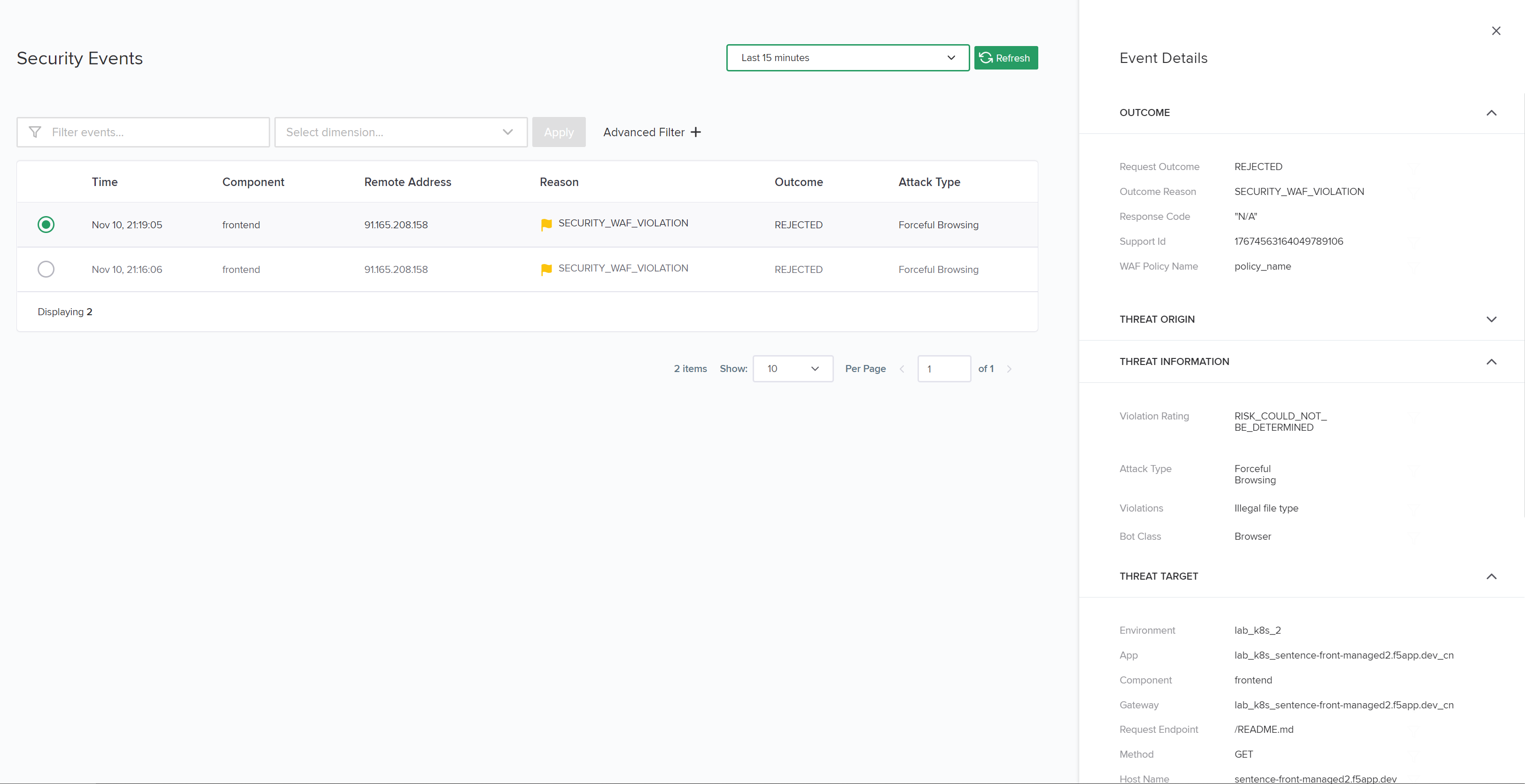
Exercise 8: Update a policy widely
SecOps needs Enhance Security by enable bot defense due to a Web Scrapping attack done from fake Google bot
On Jumphost, try to impersonated the search engine googlebot:
curl -k --user-agent "Mozilla/5.0 (compatible; Googlebot/2.1; +http://www.google.com/bot.html)" https://sentence-front-managed{{site_ID}}.f5app.dev
in
settings, enable anti-botin
mitigations, raise analarmfor bots that belong toclassesnamedtrusted-botanduntrusted-bot;blockbots that does not succeed the validation challenge, i.e. the class namedmalicious-bot;
output
{
    "policy":
    {
        "name": "policy_name",
        "template":
        {
            "name": "POLICY_TEMPLATE_NGINX_BASE"
        },
        "applicationLanguage": "utf-8",
        "enforcementMode": "blocking",
        "server-technologies":
        [
            {
                "serverTechnologyName": "Nginx"
            },
            {
                "serverTechnologyName": "Node.js"
            },
            {
                "serverTechnologyName": "Python"
            }
        ],
        "bot-defense":
        {
            "settings":
            {
                "isEnabled": true
            },
            "mitigations":
            {
                "classes":
                [
                    {
                        "name": "trusted-bot",
                        "action": "alarm"
                    },
                    {
                        "name": "untrusted-bot",
                        "action": "alarm"
                    },
                    {
                        "name": "malicious-bot",
                        "action": "block"
                    }
                ]
            }
        },
        "urls":
        [
            {
                "name": "/admin*",
                "wildcardOrder": 0,
                "protocol": "https",
                "type": "wildcard",
                "attackSignaturesCheck": true,
                "metacharsOnUrlCheck": true,
                "isAllowed": false
            }
        ],
        "filetypes":
        [
            {
                "name": "md",
                "wildcardOrder": 0,
                "allowed": false
            }
        ],
        "whitelist-ips":
        [
            {
                "blockRequests": "always",
                "ipAddress": "1.1.1.1",
                "ipNetmask": "255.255.255.255"
            }
        ],
        "blocking-settings":
        {
            "violations":
            [
                {
                    "name": "VIOL_FILETYPE",
                    "alarm": true,
                    "block": true
                },
                {
                    "name": "VIOL_URL",
                    "block": true,
                    "alarm": true
                },
                {
                    "name": "VIOL_BLACKLISTED_IP",
                    "block": true,
                    "alarm": true
                }
            ]
        },
        "response-pages":
        [
            {
                "responseContent": "<html><head><title>NGINX workshop</title></head><body><h1>Blocking page</h1><br><br>Support = <%TS.request.ID()%></body></html>",
                "responseHeader": "HTTP/1.1 200 OK\r\nConnection: close",
                "responseActionType": "custom",
                "responsePageType": "default"
            }
        ]
    }
}
save this policy in a file locally
In NGINX Controller, login as SuperSecOps
password: NGINXC0ntroller!
Go to
Services>Security Strategies>PoliciesEdit
lab5_site{{site_ID}}, import your file andSubmitAll Components that reference this policy are automatically updated
On Jumphost, check that the Googlebot request is now blocked:
curl -k --user-agent "Mozilla/5.0 (compatible; Googlebot/2.1; +http://www.google.com/bot.html)" https://sentence-front-managed{{site_ID}}.f5app.dev
Retrieve the support ID and see details in Security events
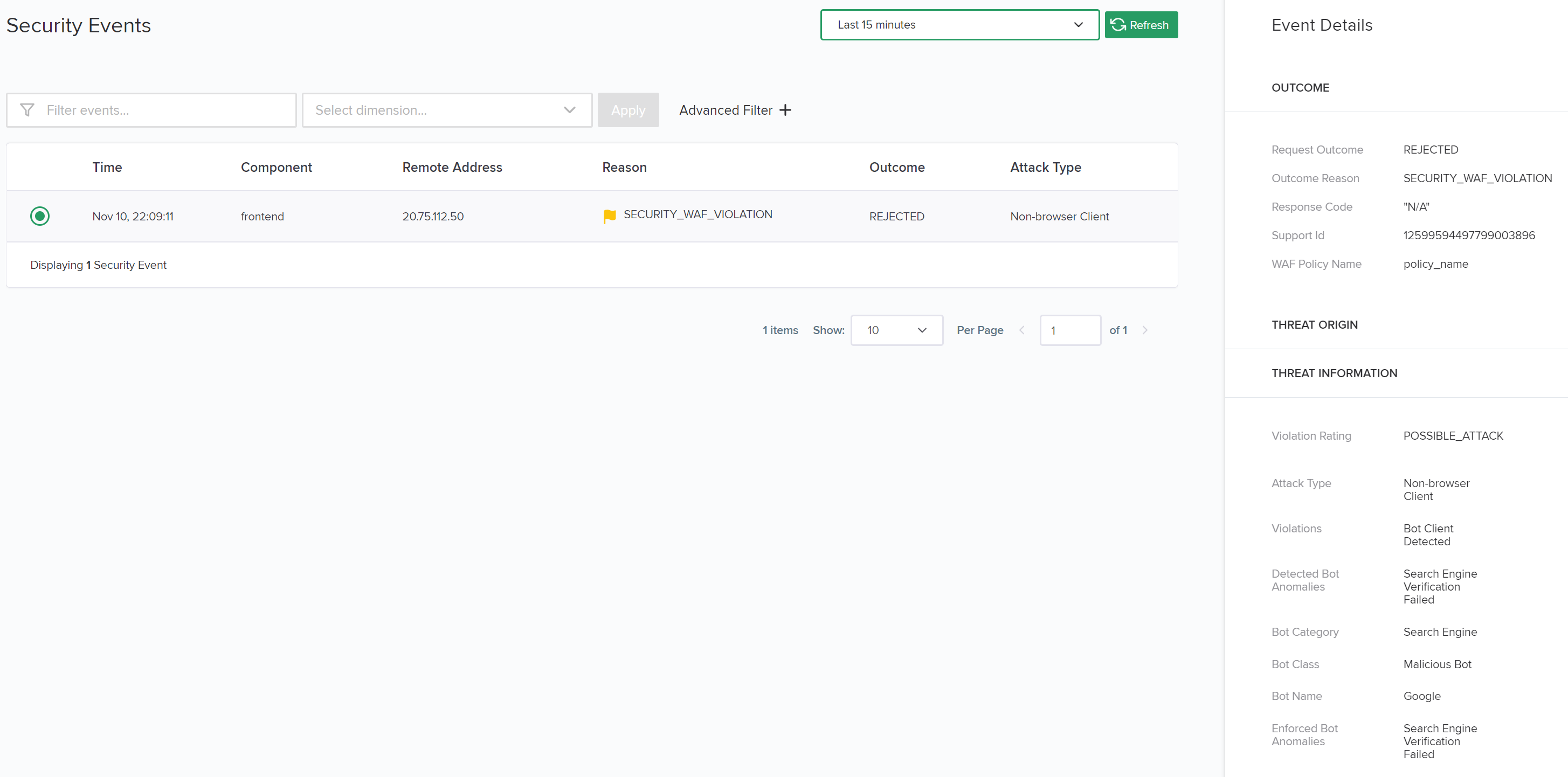
Exercise 9: False Positive > Update a specific policy
SecOps needs to update a policy for a Specific App due to a False Positive. During functional test in QA environment, a signature were raised. SQUAD asked to their “Security Coach” to tag them as False Positive. Application Developers will update their code in next dev Sprint, update task is added in backlog. For this current Sprint, the new App feature must be deployed in Production as is.
Check here the risk level associate to signature 200009283
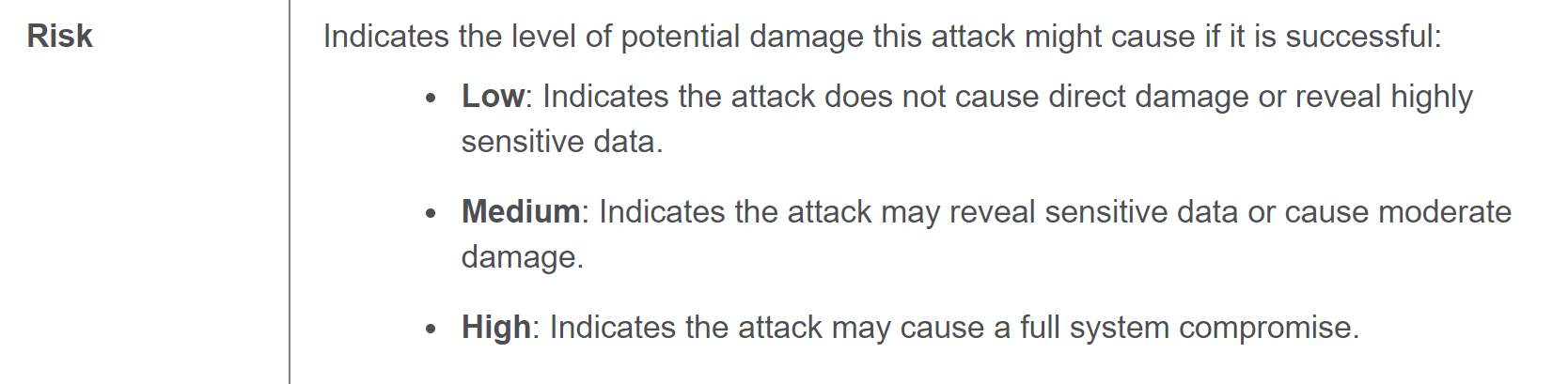
Append a
modificationblock in order to disable signature 200009283
{
    "policy":
    {
        "name": "policy_name",
        "template":
        {
            "name": "POLICY_TEMPLATE_NGINX_BASE"
        },
        "applicationLanguage": "utf-8",
        "enforcementMode": "blocking",
        "server-technologies":
        [
            {
                "serverTechnologyName": "Nginx"
            },
            {
                "serverTechnologyName": "Node.js"
            },
            {
                "serverTechnologyName": "Python"
            }
        ],
        "bot-defense":
        {
            "settings":
            {
                "isEnabled": true
            },
            "mitigations":
            {
                "classes":
                [
                    {
                        "name": "trusted-bot",
                        "action": "alarm"
                    },
                    {
                        "name": "untrusted-bot",
                        "action": "alarm"
                    },
                    {
                        "name": "malicious-bot",
                        "action": "block"
                    }
                ]
            }
        },
        "urls":
        [
            {
                "name": "/admin*",
                "wildcardOrder": 0,
                "protocol": "https",
                "type": "wildcard",
                "attackSignaturesCheck": true,
                "metacharsOnUrlCheck": true,
                "isAllowed": false
            }
        ],
        "filetypes":
        [
            {
                "name": "md",
                "wildcardOrder": 0,
                "allowed": false
            }
        ],
        "whitelist-ips":
        [
            {
                "blockRequests": "always",
                "ipAddress": "1.1.1.1",
                "ipNetmask": "255.255.255.255"
            }
        ],
        "blocking-settings":
        {
            "violations":
            [
                {
                    "name": "VIOL_FILETYPE",
                    "alarm": true,
                    "block": true
                },
                {
                    "name": "VIOL_URL",
                    "block": true,
                    "alarm": true
                },
                {
                    "name": "VIOL_BLACKLISTED_IP",
                    "block": true,
                    "alarm": true
                }
            ]
        },
        "response-pages":
        [
            {
                "responseContent": "<html><head><title>NGINX workshop</title></head><body><h1>Blocking page</h1><br><br>Support = <%TS.request.ID()%></body></html>",
                "responseHeader": "HTTP/1.1 200 OK\r\nConnection: close",
                "responseActionType": "custom",
                "responsePageType": "default"
            }
        ]
    },
    "modifications":
    [
        {
            "entityType": "signature",
            "entity":
            {
                "signatureId": 200001475
            },
            "entityChanges":
            {
                "enabled": false
            },
            "action": "add-or-update"
        }
    ]
}
extra time : As describe in Exercise 7, create a new strategy and attach it to component
Extra time: API Protection
Sentence API is wide opened on Internet, please do something to protect it! Developpers have saved their API specification in this repository
Create a local file on your computer
Copy paste the policy below.
Note Only the emphasize lines are specific for each API Protection policy, the others are generic (source: NGINX App Protect API Security template Policy file)
{
    "policy":
    {
        "name": "sentence-api",
        "description": "Based on NGINX App Protect API Security template Policy",
        "enforcementMode": "blocking",
        "template":
        {
            "name": "POLICY_TEMPLATE_NGINX_BASE"
        },
        "urls":
        [
            {
                "name": "/_codexch",
                "type": "explicit",
                "isAllowed": true,
                "wildcardOrder": 0,
                "attackSignaturesCheck": false,
                "metacharsOnUrlCheck": false
            }
        ],
        "blocking-settings":
        {
            "violations":
            [
                {
                    "block": true,
                    "description": "Disallowed file upload content detected in body",
                    "name": "VIOL_FILE_UPLOAD_IN_BODY"
                },
                {
                    "block": true,
                    "description": "Mandatory request body is missing",
                    "name": "VIOL_MANDATORY_REQUEST_BODY"
                },
                {
                    "block": true,
                    "description": "Illegal parameter location",
                    "name": "VIOL_PARAMETER_LOCATION"
                },
                {
                    "block": true,
                    "description": "Mandatory parameter is missing",
                    "name": "VIOL_MANDATORY_PARAMETER"
                },
                {
                    "block": true,
                    "description": "JSON data does not comply with JSON schema",
                    "name": "VIOL_JSON_SCHEMA"
                },
                {
                    "block": true,
                    "description": "Illegal Base64 value",
                    "name": "VIOL_PARAMETER_VALUE_BASE64"
                },
                {
                    "block": true,
                    "description": "Disallowed file upload content detected",
                    "name": "VIOL_FILE_UPLOAD"
                },
                {
                    "block": true,
                    "description": "Illegal request content type",
                    "name": "VIOL_URL_CONTENT_TYPE"
                },
                {
                    "block": true,
                    "description": "Illegal static parameter value",
                    "name": "VIOL_PARAMETER_STATIC_VALUE"
                },
                {
                    "block": true,
                    "description": "Illegal parameter value length",
                    "name": "VIOL_PARAMETER_VALUE_LENGTH"
                },
                {
                    "block": true,
                    "description": "Illegal parameter data type",
                    "name": "VIOL_PARAMETER_DATA_TYPE"
                },
                {
                    "block": true,
                    "description": "Illegal parameter numeric value",
                    "name": "VIOL_PARAMETER_NUMERIC_VALUE"
                },
                {
                    "block": true,
                    "description": "Illegal URL",
                    "name": "VIOL_URL"
                },
                {
                    "block": true,
                    "description": "Illegal parameter",
                    "name": "VIOL_PARAMETER"
                },
                {
                    "block": true,
                    "description": "Illegal empty parameter value",
                    "name": "VIOL_PARAMETER_EMPTY_VALUE"
                },
                {
                    "block": true,
                    "description": "Illegal repeated parameter name",
                    "name": "VIOL_PARAMETER_REPEATED"
                }
            ]
        },
        "open-api-files":
        [
            {
                "link": "https://raw.githubusercontent.com/nergalex/f5-nap-policies/master/policy/open-api-files/sentence-api.f5app.dev.yaml"
            }
        ]
    }
}
In NGINX Controller, login as SuperSecOps
password: NGINXC0ntroller!
Go to
Services>Security StrategiesCreate a strategy named
lab5_site{{site_ID}}_apithat reference a policy named alsolab5_site{{site_ID}}_apiImport your file and check if JSON syntax is green
In NGINX Controller, login as DevOps owner of your site
email: devops{{ site_ID }}@f5cloudbuilder.dev
password: NGINXC0ntroller!
Go to
Services>Apps>sentence-api-managed{{ site_ID }}.f5app.dev>Components
ToDo Remove all components during creation and create only one named “main” based on ‘/’
Delete all components except name
Click on
Edit component>URIs>/nameand rename uri as/Click on
Edit component>SecurityChoose Security Strategy:
lab5_site{{site_ID}}_apithenSubmitOn your browser, check that URLs below are blocked and retrieve
support IDin Security events on Controller:
https://sentence-front-api{{site_ID}}.f5app.dev/README.md
https://sentence-front-api{{site_ID}}.f5app.dev/admin